Behind almost every AI feature that has shipped in the past three years, from chat assistants to code completion to document summarization, sits the same architectural decision: the application does not run the language model itself. It sends text over the network to a model hosted on someone else's GPUs and receives generated text back. The interface that makes this possible, the LLM API, has quietly become one of the most consequential pieces of infrastructure in modern software, and its conventions now shape how a whole generation of products is built.
An LLM API (application programming interface for a large language model) is an HTTP interface for submitting a prompt to a hosted model and receiving its output. That one sentence hides a fair amount of machinery: a request format that encodes conversations, a billing model based on tokens, a streaming protocol for delivering output as it is generated, and a de facto wire standard that most of the industry has converged on. This post walks through each piece, aimed at readers who are about to make their first API call or who want to understand what actually happens when their application does.
The request: what you send
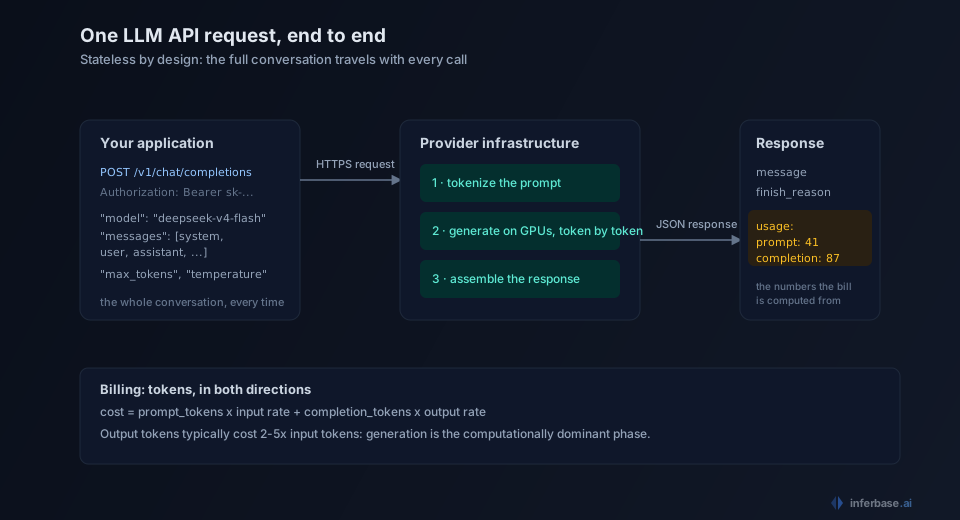
A chat completion request is a JSON document with three essential parts: which model to run, the conversation so far, and generation settings.
{
  "model": "deepseek-v4-flash",
  "messages": [
    {"role": "system", "content": "You are a support assistant for an invoicing product."},
    {"role": "user", "content": "How do I export last month's invoices as CSV?"}
  ],
  "max_tokens": 400,
  "temperature": 0.3
}
The messages array is the interesting part. LLM APIs are stateless: the provider does not remember your previous requests, so every call carries the entire conversation history the model should see. Each message has a role. The system role sets standing instructions, the user role carries what the person typed, and the assistant role carries the model's own earlier replies, which you include so the model can follow the thread. A long chat session is therefore a progressively larger request, which has direct cost implications covered below, and eventually collides with the model's context window.
The remaining fields tune generation. max_tokens caps how much output the model may produce, and temperature controls how deterministic the output is. There are several more of these knobs, and they deserve their own treatment; the short version is that the defaults are reasonable and the settings worth understanding first are the ones in the example.
The response: what comes back
The response is JSON as well, and two parts of it matter to nearly every application:
{
  "id": "chatcmpl-8Xq2...",
  "model": "deepseek-v4-flash",
  "choices": [
    {
      "message": {"role": "assistant", "content": "Head to Reports, pick a date range..."},
      "finish_reason": "stop"
    }
  ],
  "usage": {"prompt_tokens": 41, "completion_tokens": 87, "total_tokens": 128}
}
The generated text lives in choices[0].message.content. Next to it, finish_reason says why generation ended: stop means the model finished naturally, while length means it hit the max_tokens cap mid-thought, a distinction worth checking in production because a truncated answer often looks complete at a glance.
The usage block is the billing record. It reports how many tokens the input consumed and how many the model generated, and those two numbers multiplied by the model's per-direction rates are what the request cost.
Tokens: the unit of everything
LLM APIs do not price by request, by character, or by word. They price by token, and tokens are also the unit of the model's memory limits, so the concept is unavoidable. A token is a chunk of text from the model's fixed vocabulary, usually a word fragment: common English words are often one token, rarer words split into several, and a rough working figure is 3 to 4 characters of English per token. Our tokenization explainer covers how the splitting actually works.
Two properties of token billing shape application design. The first is directionality: output tokens cost more than input tokens, typically 2 to 5 times more, because the generation phase dominates the computation. A workload that produces long answers from short questions has very different economics from one that summarizes long documents into short outputs, even at identical total token counts.
The second is the statelessness tax. Because every request carries the full conversation, turn 20 of a chat re-sends turns 1 through 19 as input tokens. Conversation cost therefore grows quadratically with length unless the application summarizes or truncates history, and features like prompt caching exist precisely to soften this. The per-token arithmetic is also where the less obvious costs of these APIs hide, a topic we treat separately in the hidden costs of LLM APIs.
Streaming: output as it is generated
A model producing a 500-token answer takes several seconds to finish, and making the user watch a spinner for the duration is poor product experience. Streaming solves this: with "stream": true in the request, the provider returns output incrementally over server-sent events as the model generates it, one small delta at a time, which is what produces the typing effect every chat interface now has.
Streaming changes the latency metric that matters. For a streamed response, the user's perception is dominated by time to first token (TTFT), how long before the first visible output arrives, rather than total completion time. Providers report and optimize these separately, and they diverge sharply: a model can have excellent TTFT and mediocre total throughput, or the reverse.
Keys, limits, and errors
Access is controlled by an API key, a secret string sent in the Authorization header of every request. The key ties requests to an account for billing and carries the account's permissions and limits. Standard hygiene applies: keys live in server-side environment variables or a secrets manager, never in client-side code or a repository, because a leaked key spends your budget.
Every account also carries rate limits, caps on requests and tokens per minute, and a production integration has to handle the errors that come back over HTTP: 429 when a rate limit is hit, 5xx when the provider has a problem, and 400 when the request itself is malformed. The practical response to 429 and 5xx is retry with exponential backoff, and beyond a single provider, fallback chains route the request elsewhere when a provider is down rather than surfacing the failure to the user.
The OpenAI-compatible standard
The request and response shapes shown above are not just one vendor's design. OpenAI's Chat Completions format became the industry's de facto wire standard, and today nearly every serious inference provider, along with open-source serving stacks like vLLM and Ollama, exposes an endpoint that speaks it. A few vendors maintain their own native formats as well (Anthropic's Messages API is the notable one), but the compatible format is the lingua franca.
This convergence matters more than it first appears. When every provider speaks the same format, an integration written once can reach any of them by changing a base URL and a model name, and the model behind an application stops being a hardcoded commitment. The standard is not perfect, and the edges where providers diverge are worth knowing about before you rely on them, which we cover in the migration guide's compatibility notes. But the portability it enables is real, and it is the foundation the next section builds on.
From one model to many
The first API integration a team ships usually hardcodes one model. That choice tends to age poorly: models improve monthly, prices move, and different requests in the same product often deserve different models, a cheap fast model for simple lookups and a stronger one for complex reasoning. Because the compatible format makes models interchangeable at the wire level, the natural evolution is to stop choosing a model at integration time and start choosing per request.
That is the idea behind a single API surface for multiple providers, and the step after it, model routing, where the serving layer picks the model for each request against a cost, latency, or quality objective. The LLM API is the interface that makes all of this composable: once applications and models agree on a wire format, everything between them, aggregation, routing, fallbacks, caching, becomes infrastructure that can be added without touching application code.
Where to go from here
The fastest way to make these concepts concrete is to make a few calls and read the responses: send the same prompt at different temperature values, watch the usage block grow as a conversation lengthens, and deliberately trigger a length finish to see what truncation looks like. The Inferbase playground is a zero-setup place to do that against a range of models, and the model catalog shows the per-token rates and context windows the requests are priced against. From there, the posts linked throughout this article each pick up one thread, tokens, context, caching, fallbacks, routing, at full depth.