The gap between prototype spending and production spending on LLM APIs is one of the most common surprises teams encounter when scaling AI-powered features. A prototype that costs $5/day can easily balloon to $5,000/month once real traffic hits, and most teams end up overspending by 3-5x without a clear understanding of where the waste is coming from. The waste is rarely where the price sheet suggests. The solution, in most cases, is not switching to a different provider but rather using the models you already have more intelligently.
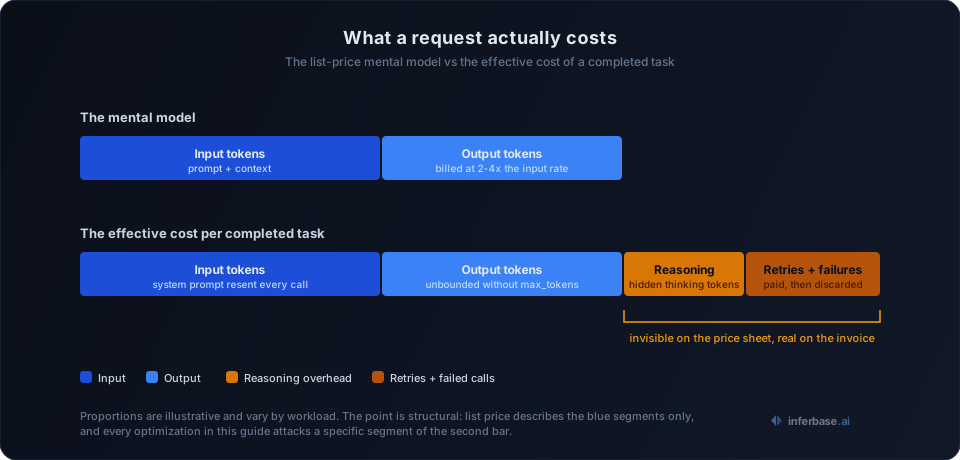
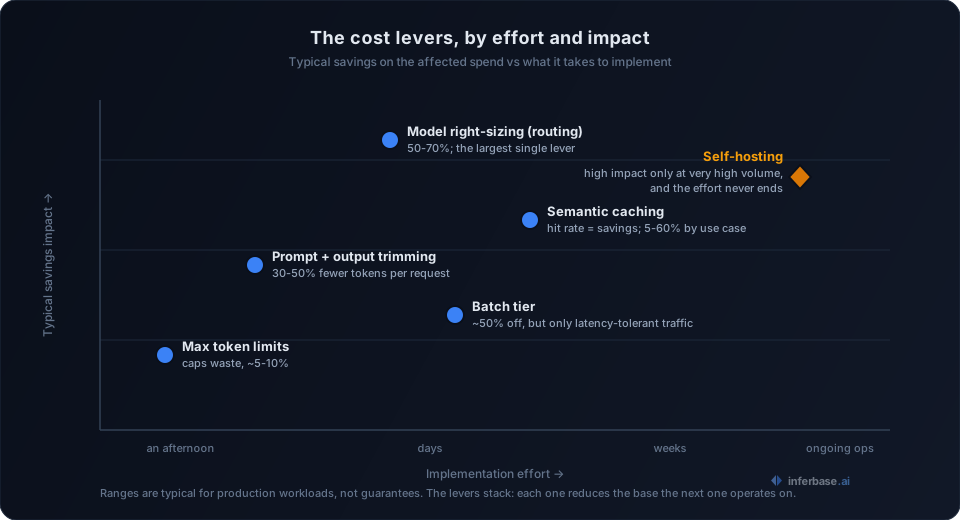
What makes LLM cost optimization a multi-dimensional problem is that no single technique is sufficient on its own. Every strategy in this guide attacks a specific segment of the effective cost above, and they are designed to stack together, each one reducing the cost base that the next one operates on. Applied in combination, they can reduce your LLM API costs by 80% or more while maintaining the output quality your application requires.
1. Use the smallest model that works
The most impactful cost reduction comes from a straightforward observation: the majority of LLM workloads do not require frontier-class models. In practice, 60-70% of typical production tasks can be handled by smaller, cheaper models with no noticeable drop in quality. The tendency to default to the most capable model for every request is understandable during prototyping, but it becomes an expensive habit at scale.
| Task | Default habit | Right-sized choice | Typical savings |
|---|---|---|---|
| Classification | Frontier flagship ($10-15/1M output) | Small tier ($0.10-1/1M output) | 90%+ |
| Summarization | Frontier reasoning model ($40-75/1M output) | Mid-tier model ($1-5/1M output) | ~95% |
| Extraction | Frontier flagship ($10-15/1M output) | Small open-weight model ($0.10-0.50/1M output) | 95%+ |
The savings are dramatic because pricing scales with model size not linearly but exponentially. A model that is 10x smaller is often 50-100x cheaper per token, which means right-sizing is the single highest-leverage optimization available.
If you are unsure which model fits your workload, our guide on choosing the right AI model walks through the evaluation process in detail.
Building a model router
The practical implementation of right-sizing is model routing: a routing layer that classifies incoming tasks by complexity and dispatches them to the cheapest model capable of handling them correctly.
def route_to_model(task: dict) -> str:
    complexity = estimate_complexity(task)

    if complexity < 0.3:
        return "small-tier-model"   # Simple tasks
    elif complexity < 0.7:
        return "mid-tier-model"     # Medium tasks
    else:
        return "frontier-model"     # Complex reasoning
The estimate_complexity function is where most of the engineering effort concentrates. A simple version might check input length, whether the task requires multi-step reasoning, and whether the output needs to follow a strict format. A more sophisticated version uses a small classifier model (itself very cheap to run) to score task difficulty on a continuous scale.
The recommended approach is to start simple: route based on task type first, sending classification requests to the small model and multi-document synthesis to the large one. Once you have enough data on which tasks actually require the expensive model and which do not, you can introduce dynamic routing based on measured complexity scores. The managed alternative is an LLM routing platform that makes this decision per request with a trained classifier, which is worth evaluating before committing engineering time to building and maintaining your own.
When to consider open-source models
For high-volume, well-defined tasks like classification or extraction, self-hosted open-source models can push costs even lower than API pricing allows. A small open-weight model running on a single GPU handles thousands of requests per hour at a fraction of what the equivalent API calls would cost. The trade-off is operational overhead: instead of paying per token, you are managing infrastructure, handling scaling, and maintaining uptime. Our cost breakdown of self-hosting DeepSeek-V3 works through a concrete example of where the crossover point between API pricing and self-hosting actually sits.
The decision between open-source and proprietary models depends on your volume, latency requirements, and how much infrastructure work your team can absorb. For most teams, the optimal configuration is a hybrid approach: APIs for complex tasks where quality is paramount, and self-hosted models for the high-volume simple workloads where cost per request dominates the decision.
2. Optimize your prompts for token efficiency
Every token in an LLM API call costs money, both on the input side and the output side, which means verbose prompts create a compounding cost problem across every request your application makes. Prompt optimization is not about being terse for its own sake but about eliminating tokens that add cost without improving output quality.
Before (847 tokens):
I would like you to please analyze the following customer review
and determine what the overall sentiment is. Please categorize it
as either positive, negative, or neutral. Also please explain your
reasoning in detail...
After (52 tokens):
Classify this review's sentiment as positive, negative, or neutral.
Reply with only the classification.

Review: {text}
That is a 94% reduction in input tokens per request. At 500K requests/month, the difference between these two prompts amounts to roughly $1,200 in input token costs alone, and this is before accounting for the output side.
Prompt optimization tactics
- Eliminate pleasantries. Words like "Please," "I would like," and "Thank you" cost tokens and have no measurable effect on output quality.
- Constrain output format. Instructions like "Reply with only X" prevent the model from generating verbose explanations you will discard anyway, saving output tokens which are typically 2-4x more expensive than input tokens.
- Use abbreviations in system prompts. Models understand compressed instructions well. "Classify sentiment: pos/neg/neutral. Output: classification only." performs equivalently to the verbose version.
- Say it once. Repeating the same instruction in different phrasings is a common pattern in hand-written prompts, and each repetition costs tokens without improving compliance.
Because output tokens are typically 2-4x more expensive than input tokens, constraining output length provides the biggest per-request savings. A response that is 50 tokens instead of 500 saves more money than trimming the prompt by the same amount. This is a direct consequence of how inference works: output tokens are generated one at a time during the sequential decode stage, which makes output length the dominant factor in both what a request costs and how long it takes. Trimming output is the rare optimization that improves latency and cost at the same time.
System prompt compression
Your system prompt is sent with every single API request, which makes it a silent multiplier on your total token consumption. If your system prompt is 1,000 tokens and you make 100K requests/month, that is 100M tokens of system prompt overhead alone. Compressing it from 1,000 to 300 tokens eliminates 70M tokens monthly.
Effective compression techniques include removing examples that do not measurably improve output quality, replacing long-form instructions with structured formats, and testing whether shorter versions produce equivalent results. Most system prompts can lose 40-60% of their tokens without any observable degradation in output, but you should validate this empirically with your actual workload rather than assuming.
3. Implement semantic caching
Many LLM-powered applications receive similar or identical queries with surprising frequency, and a semantic cache allows you to serve stored responses for these repeat queries instead of making new API calls. The principle is simple: if someone has already asked this question and received a good answer, there is no reason to pay for the same computation again.
Semantic caching is distinct from provider-side prompt caching, which discounts the repeated prefix of a prompt (typically the system prompt and shared context) rather than skipping the call entirely. The two operate at different layers and stack: prompt caching reduces the price of the calls you make, semantic caching reduces how many calls you make.
class SemanticCache:
    def __init__(self, similarity_threshold=0.95):
        self.cache = {}
        self.threshold = similarity_threshold

    def get_or_compute(self, prompt, llm_call):
        cache_key = self._compute_key(prompt)

        if cache_key in self.cache:
            return self.cache[cache_key]

        result = llm_call(prompt)
        self.cache[cache_key] = result
        return result
The example above demonstrates exact-match caching. For higher hit rates, you can add embedding-based similarity matching: compute an embedding of the incoming query, compare it against cached query embeddings, and return the cached response if the cosine similarity exceeds your threshold. This captures paraphrased versions of the same question that exact matching would miss.
Real-world cache hit rates
Cache effectiveness varies significantly by use case, and understanding the expected hit rates for your application type helps you estimate the return on implementing a caching layer:
- Customer support bots: 40-60% hit rate (many users ask the same questions)
- Code assistants: 20-30% hit rate (queries are more varied)
- Document Q&A: 30-50% hit rate (depends on document scope)
- Content generation: 5-15% hit rate (each request is usually unique)
A 40% cache hit rate translates directly to 40% fewer API calls and therefore a 40% cost reduction. Beyond the cost benefit, cache lookups are near-instant, so cached responses also improve latency for end users.
Cache invalidation
The challenge with any caching strategy is knowing when cached responses become stale. For most LLM caches, a TTL (time-to-live) approach works well: set cached responses to expire after a period that matches your data freshness requirements. Support bot answers can live for days or even weeks. Responses that reference real-time data should expire in minutes. The TTL should reflect how quickly the underlying information changes, not an arbitrary default.
4. Batch requests when possible
If your workload is not latency-sensitive, batching requests can unlock substantial discounts that are unavailable for individual API calls. Most major providers offer a batch tier at roughly 50% off standard pricing for requests that can tolerate up to 24-hour turnaround, and as we noted in our guide to AI inference, it is the single largest published discount most teams underuse.
Good candidates for batching:
- Nightly content moderation runs
- Bulk document processing and summarization
- Dataset labeling and enrichment
- Email classification and routing
- Periodic report generation
Batching also reduces operational overhead from connection setup and rate limiting. Instead of hitting rate limits with 1,000 concurrent requests and dealing with retries and backoff logic, you submit them as a batch and receive results when processing completes.
Structuring your pipeline for batching
The architectural change required for batching is separating request creation from response consumption. Instead of making synchronous call-and-wait requests in a loop, you queue requests during the day and submit them as a batch during off-peak hours. This requires some infrastructure (a job queue and a results store) but the 50% cost savings make the investment worthwhile for any workload processing more than 10K requests daily.
Not every provider offers a formal batch API, but you can implement your own batching layer regardless. Collect requests into groups of 50-100, send them with a small delay between groups to stay under rate limits, and process results asynchronously. Even without a provider pricing discount, this approach reduces failed requests from rate limiting and simplifies retry logic, both of which have indirect cost benefits.
5. Set max token limits
Setting max_tokens in your API calls is one of the simplest cost controls available, yet many production deployments omit it entirely. Without a token limit, the model may generate far more output than your application needs, and you pay for every token regardless of whether you use it.
# No limit: model might generate 2000 tokens
response = client.chat.completions.create(
    model="frontier-model",
    messages=messages,
)

# Constrained to what you actually need
response = client.chat.completions.create(
    model="frontier-model",
    messages=messages,
    max_tokens=150,
)
For classification tasks, 10-20 tokens is usually sufficient. For summaries, 100-200 tokens. For longer-form content, set the limit to the maximum useful length plus a small buffer. The key is calibrating the limit to your actual requirements rather than leaving it unbounded.
Token limits also serve as a safety mechanism against runaway costs. Without max_tokens, a single malformed request can trigger thousands of output tokens. This happens more often than most teams expect, particularly with user-generated input that confuses the model into producing repetitive or off-topic output.
One common mistake is setting max_tokens too low and truncating useful output. You should test your limits against real queries, not just best-case examples. If 5% of responses are getting cut off, increase the limit slightly. The goal is to cap waste, not to clip legitimate output.
Some providers also offer a stop parameter that halts generation when the model outputs a specific sequence. For structured output like JSON or CSV, combining max_tokens with a stop sequence gives you tight cost control without risking truncation of valid responses.
6. Use streaming to fail fast
Streaming allows you to monitor model output in real-time and abort early if the response is heading in the wrong direction, which means you stop paying for output tokens the moment you detect a problem rather than waiting for the full response to complete.
stream = client.chat.completions.create(
    model="frontier-model",
    messages=messages,
    stream=True,
)

output = ""
for chunk in stream:
    token = chunk.choices[0].delta.content or ""
    output += token
    if looks_wrong(output):
        break  # Stop paying for bad output
The looks_wrong function can check for hallucination markers, off-topic responses, or output that does not match the expected format. If the model starts generating HTML when you asked for JSON, there is no reason to wait for it to finish generating tokens you will discard. Early termination on a 2,000-token response that goes wrong after 200 tokens saves you 90% of what that failed request would have cost.
Streaming also improves perceived latency for user-facing applications, since the user sees tokens appear immediately instead of waiting for the full response to generate. This is a quality-of-experience improvement that comes at no additional cost.
7. Monitor and set budgets
Cost optimization without measurement is guesswork. You cannot systematically reduce spending without knowing where it concentrates, which means observability is the foundation that makes every other strategy in this guide effective. Track spending at three levels of granularity:
- Per request: Identify expensive outliers. A single request with a 50K-token context costs more than 100 simple classification calls.
- Per feature: Understand which features drive the most spending. If your chat feature costs 5x more than search, that is where optimization effort should focus first.
- Per user: Detect abuse or unexpected usage patterns. One power user making 10K requests/day can dominate your entire monthly bill.
Daily cost breakdown example:
-------------------------------
Chat feature:     $45.20 (52%)
Search:           $22.10 (25%)
Summarization:    $12.50 (14%)
Classification:    $7.80 (9%)
-------------------------------
Total:            $87.60/day
Set hard budget limits and alerts at both the project and feature level. Most API providers support spending caps, and you should use them. A runaway loop on a Friday evening can burn through your monthly budget before anyone notices, and retroactive cost control is significantly more painful than proactive limits.
Cost attribution in practice
The implementation is straightforward: log the model, token count, and estimated cost for every API call, and attach metadata (feature name, user ID, task type) so you can slice the data by any dimension later. Even a simple CSV log provides enough visibility to identify the biggest cost drivers.
Review this data weekly. The results frequently reveal surprises: a feature you assumed was cheap turns out to be your biggest expense because of high prompt token counts, or a small number of users account for a disproportionate share of total spending. These insights determine where to focus optimization effort for maximum return.
One-time audits are not enough, because the ground moves under a tuned setup. Providers reprice models and swap model versions behind stable names without announcements, and the hidden costs of LLM APIs (retries, rate-limit backoff, reasoning overhead) push your effective rate away from the list rate you originally planned around. An optimization pass that saved 40% six months ago may be quietly leaking part of that saving back today. Re-check effective cost per completed task, not just the price sheet, on a recurring schedule.
If you are running models on your own infrastructure rather than using APIs, the cost calculation changes but the need for measurement remains equally important. Our GPU sizing guide covers how to estimate infrastructure costs for self-hosted deployments.
What most cost guides leave out
The seven strategies are well established. What operating a routing layer across providers has taught us, and what rarely makes it into cost guides, is where the effort actually pays off:
- The biggest levers sit above the infrastructure. Model right-sizing and output trimming are application-level decisions, and they routinely save more than any amount of serving-stack tuning. Teams that start with infrastructure optimization are usually optimizing the smaller number first.
- The cheapest model is rarely the cheapest system. A model with a lower per-token price that needs longer prompts to hit the same quality, fails format checks more often, or triggers more retry loops costs more per completed task than a nominally pricier model. Price the task, not the token.
- Failure handling is part of your price. What your system does during a provider's bad minutes (fail, queue, or reroute) is an economic decision made in advance. Fallback chains determine whether an outage costs you availability, money, or neither.
- Savings estimates decay. Every number in this guide was measured against a moving target. The re-audit habit from strategy 7 is what keeps the other six honest.
Combined impact on LLM cost optimization
The strategies described above are designed to compound. Each one reduces the cost base that the next one operates on, which means the cumulative effect is multiplicative rather than additive.
| Strategy | Savings | Cumulative cost |
|---|---|---|
| Baseline | - | $10,000/mo |
| Right-size models | -50% | $5,000/mo |
| Prompt optimization | -30% | $3,500/mo |
| Semantic caching | -35% | $2,275/mo |
| Batching | -15% | $1,934/mo |
| Token limits | -10% | $1,740/mo |
| Total | -83% | $1,740/mo |
The order in this table reflects the recommended implementation sequence. Right-sizing models delivers the biggest single improvement, so start there. Prompt optimization and caching come next because they reduce token volume across the board. Batching and token limits provide smaller but still meaningful gains on top of the earlier optimizations. Monitoring ties everything together by revealing where the remaining spend concentrates and where further optimization will have the most impact.
Start by auditing your current spending. Most providers have usage dashboards that break down costs by model and endpoint. Browse models in our catalog to find cheaper alternatives for your heaviest workloads, then implement one strategy at a time and measure the impact before moving to the next. Use the comparison tool to evaluate quality vs. cost trade-offs for specific tasks before committing to a model switch.
The strategy with the highest ceiling also generalizes the furthest. Right-sizing applied once is a migration; applied continuously, per request, it becomes model routing, which treats "which model should handle this?" as a decision your infrastructure makes automatically instead of one your team revisits every quarter. If you have worked through this guide and the largest remaining line item is still model choice, that is the technique to read next.