With hundreds of AI models now available across a widening range of cost, latency, and specialization profiles, the question facing most teams is no longer "which model is best?" but rather "which model is best for what I am building?" The distinction matters because the cost of choosing wrong is not merely theoretical. Running a frontier model on a simple classification task can cost 10x more than a smaller model that performs equally well on that task, while going too cheap on a complex reasoning problem produces outputs that are functionally useless.
Choosing the right AI model, then, is a multi-dimensional optimization problem. This guide provides a structured framework for navigating it: five evaluation dimensions, production architecture patterns for combining models, a methodology for evaluating quality on your own data, and a worked example that ties the pieces together.
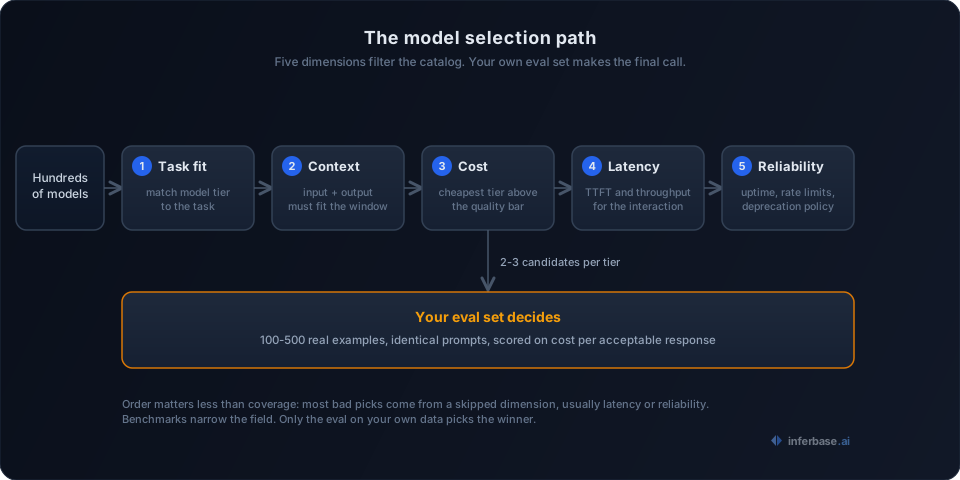
Five dimensions for choosing an AI model
1. Task fit
The most consequential decision in model selection is matching the model tier to the task. Different categories of models are optimized for different types of work, and the performance differences between tiers are significant enough that using the wrong one is either wasteful or ineffective.
| Task type | Model category | What matters | Current examples |
|---|---|---|---|
| General chat | Frontier general-purpose | Balanced reasoning and speed | GPT-4o, Claude 3.5 Sonnet, Gemini 1.5 Pro |
| Code generation | Frontier with strong code training | Instruction following, code benchmarks | Claude 3.5 Sonnet, GPT-4o, DeepSeek Coder |
| Long document analysis | Large context frontier | 200K-1M+ token windows | Gemini 1.5 Pro, Claude 3 |
| Classification / extraction | Small open source | Fast, cheap. Overkill to use a frontier model here | Llama 3 8B, Mistral 7B, Phi-3 |
| Multi-step reasoning | Reasoning-optimized | Spends more compute per answer for harder problems | o1, o3, DeepSeek-R1 |
| Vision | Natively multimodal | Built-in vision, not bolted on | GPT-4o, Gemini 1.5 Pro, Claude 3.5 Sonnet |
| Structured output (JSON) | Constrained decoding support | Reliable JSON mode, function calling | GPT-4o, Mistral Large, any model via Outlines/LMQL |
To illustrate why this matters: a customer support bot that answers shipping questions and a legal contract analyzer both fall under "chatbot," but they require very different model tiers. The support bot handles known, repetitive queries where a mid-tier or even small open-source model performs well. The contract analyzer requires nuanced reasoning over long, complex documents where only a frontier model produces reliable results. When a new model enters the ecosystem, the right approach is to slot it into its category, run your evals, and swap it in if it outperforms what you are currently using. Our coding model guide is a worked example of running exactly this process for one category.
2. Context window
Context windows determine how much text a model can process in a single request, and they impose hard constraints on what types of tasks a model can handle without supplementary architecture like retrieval-augmented generation (RAG).
| Context tier | Typical range | Good for |
|---|---|---|
| Small | 4K-8K tokens | Short conversations, single-turn tasks |
| Standard | 32K-128K tokens | Most documents, multi-turn chat with history |
| Large | 200K+ tokens | Entire codebases, long legal documents |
| Massive | 1M+ tokens | Books, video transcripts, multi-document analysis |
A quick way to verify whether your use case fits within a given context window:
def check_context_fit(
    doc_tokens: int,
    system_tokens: int,
    max_output: int,
    context_window: int,
) -> bool:
    total = doc_tokens + system_tokens + max_output
    return total <= context_window
There are two aspects of context windows that teams frequently underestimate.
First, larger windows cost proportionally more. Processing 100K tokens costs roughly 100x more than processing 1K tokens. If your application stuffs an entire knowledge base into context for every request, you are almost certainly better served by a RAG pipeline that retrieves only the relevant portions.
Second, the position of important context within a long prompt affects model performance. Liu et al. ("Lost in the Middle," 2023) demonstrated experimentally that models tend to miss information buried in the middle of long prompts. Placing the most critical content at the beginning and end of the context window produces measurably better results.
3. Cost
AI model costs break down into three components: input tokens (what you send), output tokens (what the model generates, typically 2-4x more expensive per token), and infrastructure costs (GPU rental if self-hosting).
While specific prices shift constantly, the tier structure remains stable:
| Model tier | Input (per 1M tokens) | Output (per 1M tokens) | When to use |
|---|---|---|---|
| Frontier | $2-15 | $10-75 | Complex reasoning, creative, high-stakes |
| Mid-tier API | $0.15-1 | $0.60-5 | Most production workloads |
| Small open source (hosted) | $0.05-0.60 | $0.05-0.80 | High volume, simple tasks |
| Small open source (self-hosted) | ~$0.10 flat | ~$0.10 flat | Full control, very high volume |
The price gap between tiers spans two orders of magnitude, which means that the cheapest model meeting your quality bar is, by a wide margin, the right choice.
However, API price per token does not capture total cost. Several factors affect the true economics: retry costs (cheaper models fail more often on hard tasks, and each retry consumes additional tokens), prompt engineering time, verbose output from chatty models (constrainable via max_tokens), and batch API discounts (some providers offer 50% off for asynchronous processing with 24-hour turnaround).
A pattern that works well in practice is to start with a frontier model to validate your use case, then systematically downgrade to cheaper tiers until quality drops below your threshold. Your eval suite is what tells you when you have gone too far. We cover additional cost reduction strategies in our LLM cost optimization guide.
4. Latency
For real-time applications, time-to-first-token (TTFT) and tokens-per-second throughput matter as much as output quality. The acceptable latency depends entirely on the interaction pattern.
| Use case | TTFT target | Throughput target | Notes |
|---|---|---|---|
| Interactive chat | < 500ms | 30+ tok/s | User is watching and waiting |
| Autocomplete | < 200ms | 50+ tok/s | Must feel instant or users ignore it |
| Background processing | Does not matter | Maximize | Optimize for cost, not speed |
| Streaming UI | < 200ms | 20+ tok/s | Users are patient once tokens start flowing |
| Agents (tool use) | < 1s total | N/A | Total roundtrip including tool execution |
This dimension introduces a direct trade-off with model capability. Reasoning models produce better answers for complex problems but can take 10-30 seconds per response, which is acceptable for a coding assistant but entirely unusable for autocomplete. Smaller models are almost always faster, and if latency is your primary constraint, a well-prompted small model can outperform a frontier model in user satisfaction because the speed difference is that noticeable.
5. Reliability
Production systems require models you can depend on across multiple dimensions of reliability:
- Uptime: Check your provider's status page history, not just their SLA promises. Actual uptime percentages are more informative than contractual guarantees.
- Consistency: The same input should produce similar quality outputs across runs. Some models exhibit high variance between invocations.
- Rate limits: Whether your provider can handle your peak load catches teams more often than downtime does. Test at your expected peak, not your average.
- Deprecation policy: Providers have deprecated models with as little as six months notice. Any production integration should be built with the assumption that the underlying model will eventually need to be swapped.
Architecture patterns for production
Selecting a single model is the simple case. Production systems almost always combine multiple models, and three architectural patterns appear with enough regularity that they are worth treating as standard building blocks.
Model routing
Model routing sends different requests to different models based on the task type, and it is the optimization that most teams skip despite typically cutting costs by 40-70%.
def route_request(request: dict) -> str:
    if request["type"] == "classification":
        return "small-open-source"       # $0.10/1M tokens

    if request["type"] == "simple_qa":
        return "mid-tier"                 # $0.60/1M tokens

    if request["type"] == "complex_reasoning":
        return "frontier"                 # $10/1M tokens

    return "mid-tier"
The simplest version is rule-based: if you know your task types, you hardcode the routing. More sophisticated implementations use a small classifier to estimate request complexity and route dynamically. The routing criteria can include task type, input length, required output format, user tier (free vs. paid), or estimated complexity.
Fallback chains
When a primary model fails, a fallback chain routes the request to an alternative model instead of returning an error to the user.
Request
  -> Try primary model (fast, cheap)
    -> Success? Return response
    -> Failure? (timeout, bad output, rate limit)
      -> Try fallback model (different provider)
        -> Success? Return response
        -> Failure?
          -> Try last-resort model (most reliable)
            -> Return response or error
What constitutes "failure" depends on the use case: timeouts, rate limits, malformed output (expected JSON but received prose), low confidence scores, or content filter triggers.
A fallback chain that spans providers also provides protection against single-provider outages. If your entire product depends on one API and that API goes down, your product goes down with it. Maintaining a secondary provider, even one that is slightly less performant, is inexpensive insurance against a class of outages that is otherwise catastrophic.
Multi-model pipelines
Multi-model pipelines chain models together such that each model handles the step it is best suited for. A document analysis pipeline illustrates the pattern:
Step 1: Extract text from PDF
  -> Vision model (reads layouts, tables, handwriting)

Step 2: Classify document type
  -> Small model (invoice, contract, letter)

Step 3: Extract structured data
  -> Mid-tier model (follows schema, returns JSON)

Step 4: Validate and cross-reference
  -> Frontier model (catches errors, reasons about edge cases)
The frontier model only touches the final validation step, not every document. Each preceding step uses the cheapest model that handles that subtask well, which keeps the overall cost dramatically lower than routing everything through a single expensive model.
Another common pipeline variant is generate-then-judge: a fast model generates multiple candidate responses, and then a stronger model selects the best one. The judging step is comparatively cheap because it evaluates short outputs rather than generating long ones.
Generate:  Small model -> 5 candidate responses ($0.001 total)
Judge:     Frontier model -> pick the best one  ($0.005)
Total:     $0.006 vs. $0.05 for one frontier response
This approach often produces better results than a single frontier call at a fraction of the cost, because the diversity of candidates gives the judge a richer selection to work with.
How to evaluate LLM quality on your data
Benchmarks like MMLU, HumanEval, and GSM8K serve as useful indicators of general capability, but the gap between benchmark performance and real-world performance on your specific prompts can exceed 20 percentage points. The only reliable way to evaluate model quality for your use case is to test on your own data.
Build a test set that represents your traffic
Collect 100-500 real examples from your use case. These should be sampled from your actual request stream if one exists, not synthetically generated or cherry-picked.
Your test set needs three slices:
- Common cases (70%): the routine requests that constitute the bulk of your traffic. If the model fails these, nothing else matters.
- Hard cases (20%): requests that require genuine reasoning. This is the slice where model tiers differentiate most clearly.
- Edge cases (10%): adversarial inputs, ambiguous prompts, multilingual content, unusually long context.
If you do not have production traffic yet, create realistic examples, but treat them as placeholders. Replace them with real data within a month of launch. Synthetic evals give you false confidence in exactly the scenarios where accuracy matters most.
Define grading criteria before you test
Write down what constitutes a "good" response before you see any model outputs. Without predefined criteria, you will naturally rationalize whatever the frontier model produces as the quality standard.
For objective tasks (classification, extraction, math):
- Accuracy, precision, recall, F1
- Format compliance (did it return valid JSON?)
- Latency percentiles (P50, P95, P99)
For subjective tasks (chat, writing, summarization):
- Build a rubric. Rate each response on 2-4 dimensions (accuracy, helpfulness, tone, conciseness) on a 1-5 scale.
- Blind yourself to which model generated which response.
- LLM-as-judge works for rough ranking but should not be trusted for close calls. It correlates about 80% with human judgment, which is sufficient for coarse filtering but insufficient for fine-grained decisions.
Run a structured comparison
Run every candidate model on the same test set with identical prompts and temperature settings. Record the output, latency (TTFT, total time, tokens/sec), token counts, cost per request, and pass/fail on your grading criteria.
Then calculate the metric that actually matters for production decisions: cost per acceptable response.
Effective cost = (API cost per request) / (success rate)
| Model tier | Cost/request | Success rate | Effective cost | Latency P95 |
|---|---|---|---|---|
| Frontier | $0.005 | 94% | $0.0053 | 1.2s |
| Mid-tier | $0.001 | 82% | $0.0012 | 0.4s |
| Small open source | $0.0003 | 61% | $0.00049 | 0.15s |
The small model is cheapest per acceptable response, provided you can handle retries or route failures to a stronger model. If failed responses surface directly to users without a retry mechanism, the frontier model may be cheapest in terms of actual customer experience.
Automate and re-run
Build your evaluation as a script, not a one-time spreadsheet. Run it when you are considering a new model, when a provider announces an update, and on a monthly schedule. Regressions happen silently, and without automated monitoring, you will not catch them until users complain.
for model in candidate_models:
    results = []
    for example in test_set:
        start = time.time()
        output = call_model(model, example.prompt)
        elapsed = time.time() - start

        results.append({
            "model": model,
            "passed": grade(output, example.expected),
            "latency": elapsed,
            "input_tokens": count_tokens(example.prompt),
            "output_tokens": count_tokens(output),
            "cost": calc_cost(model, example.prompt, output),
        })

    report(model, results)
The teams that consistently choose the right model are not necessarily smarter about benchmarks. They have an eval suite that runs against real data, and they re-run it systematically.
Fine-tuning vs. prompt engineering
Before investing in fine-tuning, it is worth exhausting what prompt engineering can achieve. The following sequence reflects the order in which most teams should approach the problem:
- Write a clear system prompt with examples (few-shot). For most tasks, this alone gets you 80% of the way to acceptable quality.
- Improve your retrieval pipeline if using RAG. Poor retrieval quality produces poor answers regardless of the model, and this is often a more impactful fix than changing models.
- Try a stronger model tier. If mid-tier is not meeting your quality bar, test a frontier model before fine-tuning the mid-tier one. The marginal cost of a stronger model is often lower than the engineering cost of a fine-tuning pipeline.
- Fine-tune only when you have hit a ceiling with prompts and have sufficient training data (hundreds to thousands of labeled examples).
Fine-tuning makes sense for specific scenarios: classification with domain-specific labels, consistent output formatting that prompting cannot enforce reliably, reducing input token usage by baking instructions into the model weights, and lifting an open-source model to match a proprietary one on your specific task.
It does not make sense for general knowledge or reasoning (fine-tuning cannot teach a model new facts), tasks where requirements change frequently (each change would require retraining), or small datasets under 100 examples where overfitting is the likely outcome.
Worked example: choosing models for a support bot
Consider a concrete scenario: building a customer support bot for an e-commerce company.
Task fit: The primary task is conversational Q&A over known topics (order status, returns, shipping). No deep reasoning is required, which means a mid-tier model handles most questions well.
Context window: The application uses RAG to retrieve relevant support documents, so each request needs 2K-4K tokens plus conversation history. A standard context window (32K) is sufficient.
Cost estimate: At 100K conversations per month averaging 5 turns each, the system processes 500K API calls at roughly 500 input plus 200 output tokens per call:
Frontier:   500K x (500 x $2.50 + 200 x $10.00) / 1M = $1,625/mo
Mid-tier:   500K x (500 x $0.15 + 200 x $0.60)  / 1M = $97/mo
Small OSS:  500K x (500 x $0.10 + 200 x $0.10)  / 1M = $35/mo
Architecture: Rather than selecting a single model, the optimal approach combines routing with fallback:
User question arrives
  -> Classify: simple FAQ or complex issue?

Simple (order status, hours, return policy):
  -> Small open source model ($35/mo for this traffic)
  -> Fallback: mid-tier if quality check fails

Complex (disputes, complaints, multi-step):
  -> Mid-tier model (~$30/mo for ~15% of traffic)
  -> Fallback: frontier for the hardest 2%

Estimated blended cost: ~$80/mo instead of $1,625/mo
Eval plan: Build a test set of 200 real customer questions. Grade on correctness, tone, and whether the model hallucinated a policy. Run the test set against each tier, calculate cost per acceptable response, and re-run monthly.
If you are self-hosting any of these models, our GPU sizing guide covers memory requirements and hardware selection.
Common mistakes
-
Using one model for everything. Implement routing. Without it, your simple tasks are subsidizing your complex tasks at 10-100x the necessary cost.
-
Ignoring output costs. Output tokens are 2-4x more expensive than input tokens. A model that generates 500 tokens when you need 50 costs 10x more than it should. Constrain your output format.
-
Evaluating on benchmarks instead of your data. Run your actual prompts against your actual data. Benchmark scores do not transfer reliably to specific use cases.
-
No fallback strategy. If your only model sits behind one API and that API goes down, your product goes down with it. Cross-provider fallbacks are inexpensive insurance.
-
Evaluating once and forgetting. Set up automated evals on a schedule. Models get updated, regressions happen silently, and new options appear quarterly.
-
Using reasoning models for everything. They are slower and more expensive. Reasoning models are worth the cost for math, logic, and complex multi-step problems, but for classification or simple chat, they represent pure waste.
-
Vendor lock-in. Abstract your LLM calls behind a common interface. Switching models should be a configuration change, not a rewrite.
Where to go from here
- Define your requirements using the five dimensions above
- Shortlist 2-3 candidates per tier in our model catalog, or start from the current standings by use case
- Run a head-to-head comparison on your data
- Estimate GPU requirements if self-hosting
- Set up routing and fallback before you need them
Everything in this guide answers the selection question once, for a defined workload at a point in time. Production traffic is rarely that uniform, and the models themselves change underneath you. The stronger version of the same framework is applying it per request, automatically: the five dimensions become routing criteria, and the choice is re-made for every prompt instead of revisited every quarter. That is the subject of our guide to model routing.