Deploying a large language model in production is, at its core, a memory budgeting problem. The model's parameters must fit in GPU memory, along with everything the model needs at runtime to process requests, and getting this budget wrong in either direction has real consequences. Underprovisioning leads to out-of-memory crashes or severely throttled throughput, while overprovisioning means paying thousands of dollars per month for VRAM that sits idle. The gap between a two-GPU and a four-GPU configuration is $2,000-4,000 every month, and it is decided by arithmetic most teams run once, quickly, and slightly wrong.
The part they get wrong is rarely the weights, which are a single multiplication. It is the runtime memory, the KV cache above all, that turns a deployment that fits on paper into one that crashes under load. This guide walks through the full sizing math, the hardware options, and the cost trade-offs that determine whether a deployment is well-sized from day one.
GPU memory requirements for LLM inference
VRAM is the binding constraint that determines which GPUs can run a given model. The parameters themselves must reside in memory, but so does everything the model needs at inference time: the key-value cache, intermediate activations, and the serving framework's own buffers. If you are choosing between self-hosting and API access, understanding these memory requirements is what makes that decision informed rather than speculative.
The basic formula
At its simplest, the memory required to hold a model's weights is a function of two variables: the number of parameters and the precision at which they are stored.
Memory (GB) = Parameters (B) x Bytes per Parameter
For different precisions:
| Precision | Bytes per param | 7B model | 13B model | 70B model |
|---|---|---|---|---|
| FP32 | 4 | 28 GB | 52 GB | 280 GB |
| FP16/BF16 | 2 | 14 GB | 26 GB | 140 GB |
| INT8 | 1 | 7 GB | 13 GB | 70 GB |
| INT4 | 0.5 | 3.5 GB | 6.5 GB | 35 GB |
These numbers cover model weights only. In practice, you also need memory for the KV cache, activations, and framework overhead, which typically adds 20-40% on top of the weight footprint.
KV cache: the hidden memory consumer
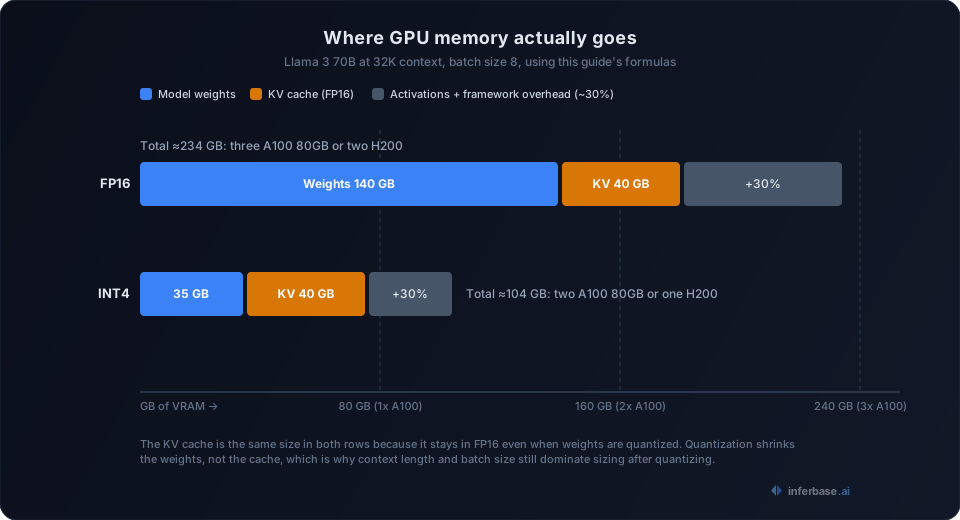
What makes GPU sizing for inference deceptive is that model weights are only part of the equation. For each concurrent request, the model maintains a key-value cache that grows linearly with sequence length, and this is where many teams underestimate their memory requirements. The mistake is common enough that we wrote a separate post on why GPU memory calculators get the KV cache wrong. A 70B model's weights might fit comfortably on two A100s, but once you add KV cache for 32K context across a batch of 8 requests, the memory bill grows by another 40+ GB.
The following function estimates KV cache memory for a given model architecture and workload:
def estimate_kv_cache_gb(
    num_layers: int,
    hidden_size: int,
    num_kv_heads: int,
    seq_len: int,
    batch_size: int,
    precision_bytes: int = 2,
) -> float:
    head_dim = hidden_size // num_kv_heads
    cache_per_token = 2 * num_layers * num_kv_heads * head_dim * precision_bytes
    total_bytes = cache_per_token * seq_len * batch_size
    return total_bytes / (1024 ** 3)
To make this concrete, consider Llama 3 70B (80 layers, 8192 hidden size, 8 KV heads in GQA), running with 32K context and a batch size of 8 in FP16:
kv_gb = estimate_kv_cache_gb(
    num_layers=80,
    hidden_size=8192,
    num_kv_heads=8,
    seq_len=32768,
    batch_size=8,
)
# kv_gb ≈ 40 GB
That is 40 GB consumed solely by the cache, on top of the 140 GB required for model weights in FP16. This is precisely why multi-GPU setups become necessary faster than the weight-only formula would suggest.
Activation memory and framework overhead
Beyond weights and KV cache, memory is also consumed by intermediate activations during the forward pass and by the serving framework itself (vLLM, TGI, or TensorRT-LLM). A reasonable rule of thumb for these components:
- Activations: 5-15% of model weight size, depending on batch size
- Framework overhead: 1-3 GB fixed, plus buffers for request scheduling
For capacity planning purposes, adding 30% to the combined weight and KV cache estimate provides sufficient headroom for traffic spikes without risking OOM crashes. Our GPU capacity planning methodology covers the full calculation in detail.
Serving framework considerations
The choice of serving framework has a meaningful impact on both memory efficiency and throughput, which in turn affects how many GPUs you need and what they cost. The three primary options for production LLM inference are vLLM, Hugging Face TGI, and NVIDIA TensorRT-LLM, each with different memory overhead and performance characteristics.
vLLM uses PagedAttention to manage KV cache memory more efficiently, reducing waste from fragmentation. In practice, this means you can serve more concurrent requests on the same GPU compared to a naive implementation. TensorRT-LLM takes a different approach, squeezing out higher throughput through kernel fusion and quantization-aware compilation, though it requires an NVIDIA-specific build step that adds deployment complexity.
For most teams, vLLM is the best starting point. It is straightforward to set up, supports a wide range of model architectures, and its continuous batching handles variable-length requests well. If you are running on NVIDIA hardware and need to maximize tokens per second, TensorRT-LLM is worth the extra setup time, but the gains are marginal unless you are operating at significant scale.
The following table illustrates the trade-offs for a Llama 3 70B in INT4 on a single A100 80GB:
| Framework | Memory used | Throughput (tokens/sec, batch 8) | Setup complexity |
|---|---|---|---|
| vLLM | ~45 GB | ~900 | Low |
| TGI | ~48 GB | ~750 | Low |
| TensorRT-LLM | ~42 GB | ~1,100 | Medium |
These numbers vary by model architecture and quantization method, but they convey the general shape of the trade-offs. The memory differences arise from how each framework manages internal buffers and KV cache allocation strategies.
Choosing the right GPU for LLM inference
Consumer vs. data center GPUs
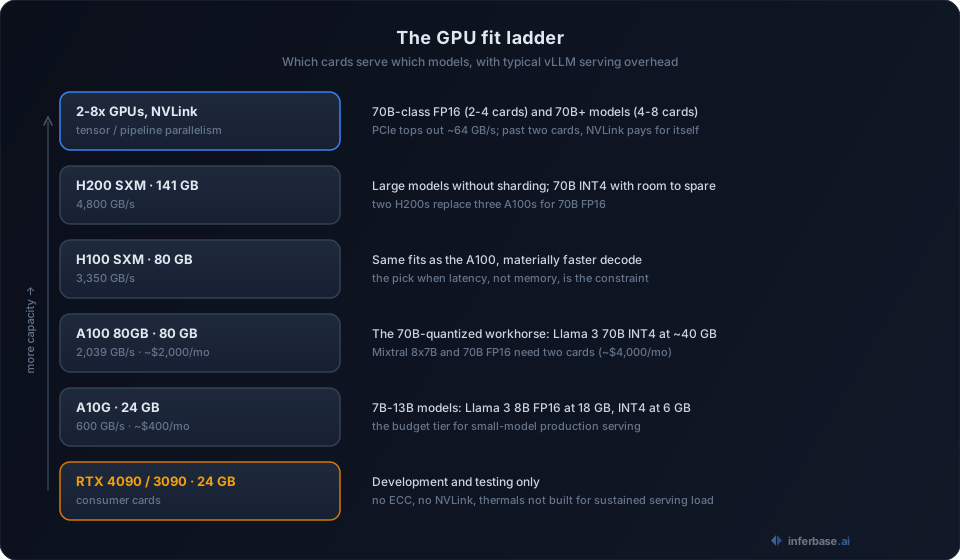
Consumer GPUs such as the RTX 4090 and RTX 3090 are suitable for development and testing, but production inference serving real user traffic calls for data center hardware. Data center GPUs offer ECC memory, higher memory bandwidth, better thermal management under sustained load, and multi-GPU interconnects that consumer cards lack.
| GPU | VRAM | Bandwidth | Best for |
|---|---|---|---|
| NVIDIA A10G | 24 GB | 600 GB/s | Small models (7B-13B), budget deployments |
| NVIDIA A100 80GB | 80 GB | 2,039 GB/s | Standard production, 70B quantized |
| NVIDIA H100 SXM | 80 GB | 3,350 GB/s | High-throughput, latency-sensitive |
| NVIDIA H200 SXM | 141 GB | 4,800 GB/s | Large models without sharding |
| AMD MI300X | 192 GB | 5,300 GB/s | Very large models, cost-competitive |
One aspect of GPU selection that is often underappreciated is that memory bandwidth matters as much as capacity for inference workloads. LLM inference is memory-bandwidth bound rather than compute bound, which means a GPU with higher bandwidth will generate tokens faster even when both GPUs have sufficient VRAM for the model.
Single GPU vs. multi-GPU setups
When a model does not fit on a single GPU, tensor parallelism is used to split it across multiple devices. The general sizing ranges are:
- 7B-13B models: Single A10G (quantized) or A100
- 34B-70B models: 2-4 GPUs with tensor parallelism
- 70B+ models: 4-8 GPUs, potentially with pipeline parallelism
Multi-GPU setups introduce additional latency from inter-GPU communication, and the interconnect technology determines how severe that overhead is. NVLink-connected GPUs (H100 SXM, H200 SXM) minimize this with 900 GB/s bidirectional bandwidth, while PCIe connections top out around 64 GB/s, which can become a meaningful bottleneck during tensor-parallel inference.
As a practical rule, if your workload requires more than two GPUs, ensure they are NVLink connected. The cost premium pays for itself in throughput. For worked multi-GPU examples with current numbers, our sizing breakdowns of Llama 3.3 70B across H100, H200, and B200 and Llama 4 Scout apply this exact method to specific deployments.
How to estimate total VRAM for your setup
With all the individual components established, the full formula for estimating total GPU memory brings them together:
def total_vram_required(
    param_billions: float,
    precision_bytes: int,
    num_layers: int,
    hidden_size: int,
    num_kv_heads: int,
    max_seq_len: int,
    max_batch_size: int,
    overhead_pct: float = 0.30,
) -> float:
    weight_gb = param_billions * precision_bytes
    kv_gb = estimate_kv_cache_gb(
        num_layers, hidden_size, num_kv_heads,
        max_seq_len, max_batch_size, precision_bytes
    )
    subtotal = weight_gb + kv_gb
    return subtotal * (1 + overhead_pct)
For a 70B model in FP16 with 32K context, batch size 8, and 30% overhead, this yields roughly 234 GB, which translates to three A100 80GB GPUs or two H200s. In INT4, the same workload drops to about 104 GB, fitting on two A100s or a single H200.
These numbers are worth running before committing to a cloud provider contract. The difference between a two-GPU and four-GPU configuration is $2,000-4,000/month, and that gap compounds over the lifetime of a deployment.
Cost optimization strategies
GPU compute is expensive, and the costs accumulate quickly at scale. A single H100 runs $3-4/hour on major cloud providers, and serving a 70B model on 4 H100s adds up to roughly $10,000-12,000/month. The following strategies are the most effective levers for bringing those costs down. For a deeper treatment of the cost dimension, see our LLM cost optimization guide.
Quantization
Reducing precision is the single most impactful lever available for GPU memory reduction:
- FP16 to INT8: roughly 50% memory reduction, with minimal quality loss for most tasks
- FP16 to INT4 (GPTQ/AWQ): roughly 75% memory reduction, with slight quality degradation on reasoning-heavy tasks
- FP16 to GGUF Q4_K_M: a good balance for CPU+GPU hybrid inference on smaller models
The practical effect is significant: a 70B model in INT4 fits on a single A100 80GB instead of two, cutting the monthly cost in half. For many production use cases (classification, extraction, summarization), INT4 quality is indistinguishable from FP16 output. For how GPTQ, AWQ, and the other methods actually differ, see our quantization, LoRA, and distillation explainer.
Right-size your context window
A common mistake in production deployments is allocating maximum context when most requests use a fraction of it. The KV cache scales linearly with the configured maximum sequence length, so setting max_model_len=4096 instead of max_model_len=131072 in vLLM can save tens of GB of VRAM per concurrent request.
Before setting this value, examine your actual token usage distribution. Most applications exhibit a long-tail pattern where 95% of requests use under 4K tokens, but the remaining 5% genuinely need more. Sizing for the 99th percentile rather than the theoretical maximum is usually the right trade-off.
Batching
Dynamic batching (continuous batching in vLLM/TGI) is one of the most effective ways to improve throughput per GPU dollar:
| Batch size | Throughput (tokens/sec) | Relative improvement |
|---|---|---|
| 1 | 100 | 1x |
| 8 | 650 | 6.5x |
| 32 | 1,800 | 18x |
| 64 | 2,400 | 24x |
The throughput gains come from better GPU utilization: a single request does not saturate the GPU's compute units, but a batch of 32 does. The trade-off is higher per-request latency at large batch sizes, so this parameter should be tuned based on your latency requirements.
Spot and preemptible instances
For workloads that can tolerate interruptions (batch processing, offline evaluation, non-real-time summarization), spot instances reduce GPU costs by 60-70%. This approach requires checkpoint-based fault tolerance, but frameworks like vLLM handle graceful shutdown well enough to make it practical.
For latency-sensitive production traffic, on-demand or reserved instances remain the appropriate choice.
Quick sizing reference
The following table provides approximate sizing for common open-source models running in FP16 with typical serving overhead (vLLM, batch size 8, 4K context):
| Model | Min VRAM | Recommended setup | Monthly cost (cloud) |
|---|---|---|---|
| Llama 3 8B | 18 GB | 1x A10G (24 GB) | ~$400 |
| Mistral 7B | 16 GB | 1x A10G (24 GB) | ~$400 |
| Llama 3 70B | 150 GB | 2x A100 80GB | ~$4,000 |
| Mixtral 8x7B | 90 GB | 2x A100 80GB | ~$4,000 |
| Llama 3 70B (INT4) | 40 GB | 1x A100 80GB | ~$2,000 |
| Qwen 2.5 72B (INT4) | 42 GB | 1x A100 80GB | ~$2,000 |
| Llama 3 8B (INT4) | 6 GB | 1x A10G (24 GB) | ~$400 |
These costs assume on-demand pricing on AWS/GCP. Reserved instances bring them down 30-40%. Spot instances bring them down 60-70%, with the trade-off of potential interruptions.
Worked example: sizing a customer support bot
To illustrate how these components come together in practice, consider deploying a Llama 3 70B for a customer support application with the following requirements: 4K average context, up to 16K max, 50 concurrent users, and p95 latency under 500ms time-to-first-token.
Step 1: Model weights. In INT4 quantization, the 70B model needs about 35 GB for weights.
Step 2: KV cache. With 50 concurrent users at 16K max context in FP16 KV cache, you need roughly 10 GB. Most requests will use less, but you size for the maximum to avoid rejecting requests under load.
Step 3: Overhead. Add 30% for activations and framework buffers: (35 + 10) x 1.3 = 58.5 GB.
Step 4: GPU selection. A single A100 80GB handles this comfortably with 20+ GB of headroom. If you need redundancy, run two A100s behind a load balancer rather than sharding the model across them.
Step 5: Cost estimate. One A100 80GB on AWS (p4d.24xlarge, amortized to single GPU) runs about $2,000/month on-demand, or roughly $1,200/month reserved. For a customer support bot handling 50 concurrent users, that is a reasonable cost.
If quality testing reveals that INT4 is not accurate enough for your specific prompts, the next step is INT8. That doubles the weight memory to 70 GB, pushing the total to roughly 104 GB, which requires two A100s at approximately $4,000/month. The recommendation is to test quantization quality before committing to the more expensive configuration.
Where sizing goes wrong in practice
The formulas above are mechanical. The failures we see in real deployments cluster around a handful of patterns that the formulas do not protect against on their own:
- Sizing errors are almost always KV-cache errors. The weights number is a single multiplication nobody gets wrong. The cache depends on the model's attention architecture, the configured maximum sequence length, and peak concurrency, three inputs that are easy to estimate optimistically and that change after launch.
- The configured maximum is the bill, not the average. Serving frameworks reserve cache for the sequence length you configure, not the length your traffic actually uses. A
max_model_lenset "just in case" at 128K pays for 128K on every concurrent slot. - Bandwidth buys speed, capacity only buys fit. Two cards that both hold the model are not equivalent: decode throughput tracks memory bandwidth, so the H100 outruns the A100 on the same model even though their VRAM is identical.
- Sizing is upstream of build-vs-buy. The point of running this math before renting anything is that the result sometimes says do not rent at all. Our DeepSeek-V3 self-hosting cost breakdown works through where the crossover between self-hosting and API access actually sits, and it is at higher volume than most teams expect.
Putting it together
The most effective approach for most production deployments is to start with quantized models and scale up to higher precision only if quality testing demonstrates a meaningful difference. For the majority of inference workloads, INT4 or INT8 quantization provides the best cost-to-quality ratio.
The GPU hardware ecosystem evolves rapidly, but the underlying sizing math does not. If you understand how weights, KV cache, and batch size interact with VRAM, you can evaluate any new GPU or model release systematically rather than relying on vendor recommendations. The GPU capacity planner runs this guide's math interactively for your model and workload, and the GPU catalog carries the spec sheet for every card mentioned here.
Sizing also answers a question bigger than hardware selection: whether to run inference yourself at all. If the monthly bill for a right-sized deployment lands above what the same traffic costs through the managed access patterns covered in what is AI inference, buying inference instead of operating it is the better engineering decision, not a compromise.