Llama 4 Scout is the first MoE release that meaningful enterprise teams are actually trying to serve themselves. Meta dropped a 109B-total / 17B-active model with a 1M context window, the open weights are real, and the throughput-per-dollar story sounds appealing on the rate-card of the providers that already host it. The sizing question that comes up almost immediately ("how many H100s do I need?") turns out to have a different answer than every public GPU calculator gives you, and the gap matters.
The short version: Scout looks like a 17B model when you measure compute and like a 109B model when you measure memory, and getting that decoupling right is the difference between a deployment that works and a deployment that OOMs on the first request. The longer version is what this post is about. We'll walk through the actual VRAM budget, the throughput math, the parallelism plan that fits, and the cost of running Scout in production at three traffic tiers.
How Mixture-of-Experts changes the sizing math
A dense transformer reads every parameter for every token. A 70B dense model reads 70B parameters per token, and the memory bandwidth required to do that 60-100 times per second is the bottleneck on H100-class GPUs. The roofline math is symmetric: weights read = compute consumed, and both scale with the parameter count.
Mixture-of-Experts breaks that symmetry. Scout has 109B total parameters but only 17B active per token: a router picks which 16 experts (out of a much larger pool) handle each token's forward pass. The remaining experts sit in VRAM doing nothing on that particular token, but they have to be there in case the router picks them on the next token. So:
- Memory holds total params. All 109B parameters must be resident in VRAM. At FP16 (2 bytes/param) that's 203 GB before you account for KV cache, activations, or runtime overhead. At FP8 it drops to ~110 GB.
- Compute reads active params per token. Throughput, prefill speed, and per-token latency all scale with the 17B active count, not the 109B total.
The practical implication: Scout uses the memory budget of a 109B model and the compute budget of a 17B model. Sizing tools that conflate the two (and most do) get one of these dimensions wildly wrong.
You can see the difference in the GPU Capacity Planner. Open the Mixture-of-Experts panel in the Model step and pick the Llama 4 Scout preset; the engine routes the 109B figure to memory and the 17B figure to compute automatically. Toggle the active-params field off (treating Scout as dense-109B) and the projected throughput drops to roughly 1/6 of what the model actually delivers. Toggle the total down to 17B (treating Scout as dense-17B) and the VRAM budget falls below 50 GB, a config that will load and then crash on the first request because there's no room for the other 92B parameters.
The VRAM budget at a glance
The component breakdown for Llama 4 Scout at FP16 with 8K context, 16 concurrent requests:
| Component | Size |
|---|---|
| Model weights (109B × 2 bytes) | 203.0 GB |
| KV cache per request (8K tokens × 32 layers × 8 KV heads × 128 head_dim × 2 bytes) | 0.5 GB |
| KV cache total (× 16 batch) | 8.0 GB |
| Activation memory (~3% of weights) | 6.1 GB |
| Runtime overhead (vLLM, ~2%) | 4.3 GB |
| Total per cluster | ~221 GB |
That doesn't fit on a single 80 GB H100. Spread across multiple GPUs via tensor parallelism, the per-GPU memory drops by 1/TP for weights and KV cache. The minimum viable configurations:
- 4× H100 SXM 80 GB at FP16: ~55 GB per GPU. Comfortable headroom. The default starting point.
- 2× H200 141 GB at FP16: ~110 GB per GPU. Also comfortable, fewer GPUs to coordinate.
- 1× B200 192 GB at FP16: single GPU, ~110 GB used. If you have access.
- 2× H100 SXM at FP8: ~55 GB per GPU. Halved precision halves the weight memory; FP8 quality loss on Scout is small enough that this is the right config for most production workloads on Hopper.
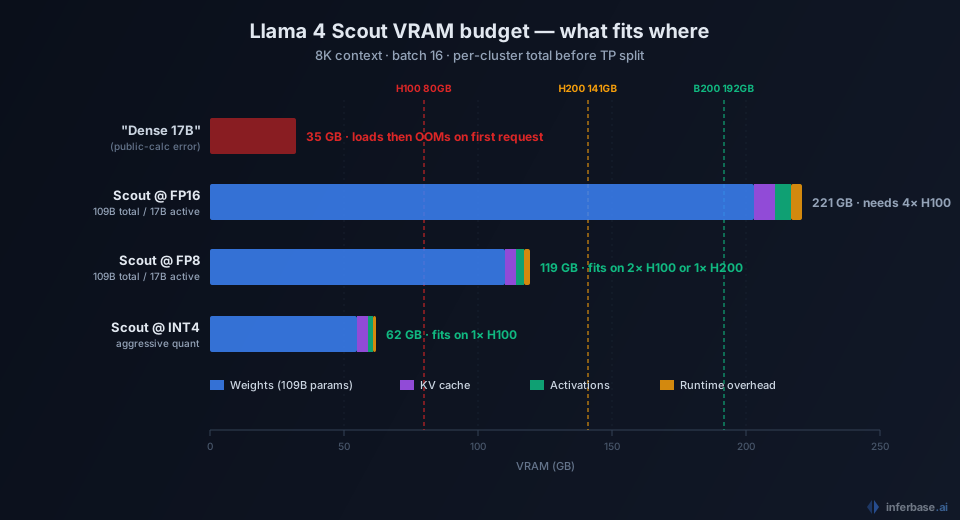
KV cache scales with context length and batch size. Going from 8K to 32K context quadruples the KV portion (from 8 GB to 32 GB at batch=16); pushing batch to 64 triples it again. Long-context, high-concurrency workloads pressure the headroom hard, and the practical batch ceiling at full 1M context is uncomfortably low. The engine warns you when you're approaching the limit.
Throughput: what to actually expect
The roofline model says decode throughput per GPU equals min(batch × bandwidth / model_size, FLOPS / (2 × params_per_GPU)). For Scout, the relevant model_size is the active 17B portion (only those weights are read per decode step), and the relevant params_per_GPU is also active params, not total.
On 4× H100 SXM with vLLM and batch=16:
- Per-GPU memory-bound throughput:
16 × 3.35 TB/s × 0.8 / (17 GB / 4)≈ 10,000 tok/s before TP communication overhead. - TP=4 communication penalty over NVLink: ~15-20%.
- Net per-cluster decode throughput: ~7,500-8,500 tok/s aggregate.
At an average response length of 500 tokens, that's roughly 15-17 requests per second sustained. P95 latency on a 1000-token input + 500-token output lands around 1.5-2.0 seconds end-to-end at this load.
The headline that matters: per-token decode throughput on Scout matches a dense 17B model on the same hardware. You aren't paying compute for the parameters you don't activate. This is what makes MoE economics work, since the cost-per-token approaches a 17B baseline, not the 109B baseline you'd guess from the model card.
Cost across three traffic tiers
Combining the 4× H100 SXM config with current per-hour rates from our pricing audit:
| Provider | $/hr (4× H100 SXM) | $/mo (24/7) | $/M tokens at 7,500 tok/s |
|---|---|---|---|
| Runpod (Secure Cloud) | $11.96 | $8,610 | $0.44 |
| Lambda Cloud | $17.16 | $12,355 | $0.64 |
| CoreWeave | $20.00 | $14,400 | $0.74 |
| AWS p5.48xlarge (1/2 of) | ~$24.00 | $17,280 | $0.89 |
At sustained production load, that's $0.44-$0.89 per million output tokens self-hosted. For comparison, Bedrock serves Scout at $0.17/M blended, and Groq runs Llama 4 Scout at $0.11 input / $0.34 output. Self-hosting only beats those rates when you have enough steady traffic to justify paying for the GPU 24/7, typically above 30B tokens per month per cluster. Below that threshold, calling Bedrock or Groq is strictly cheaper, and you skip the operational burden.
The crossover math is the same one we covered in the self-host vs serverless TCO analysis, just specialized to Scout's per-cluster cost. The general rule holds: serverless MoE inference is shockingly cheap at low-to-medium volume, and self-hosting only makes sense when your traffic floor justifies a kept-warm cluster.
What teams get wrong
Three specific failure patterns surface repeatedly:
Treating Scout as dense-17B in the sizing tool. The most common mistake. The provisioning team picks a sizing config that fits "17B at FP16" (roughly 35 GB) and ships a single H100 deployment. The model loads (just barely), but every request OOMs because the actual weight footprint is 6× larger. Fix: always specify total + active when sizing MoE models.
Skipping FP8 on Hopper. Scout's quality at FP8 is nearly indistinguishable from FP16 on standard benchmarks (within 1-2 points on MMLU-Pro), but the memory savings let you halve your GPU count or double your batch capacity. Teams that default to FP16 because it's familiar are over-provisioning by 2× without realizing it.
Running with default vLLM batch ceilings on long-context. The 1M context window is real but pressures KV cache hard. Default vLLM configurations don't pre-reserve KV pool size, and a few simultaneous long-context requests can push other batched requests off the GPU. For production deployments using >32K context, set explicit --max-num-seqs and --max-model-len flags to bound the worst case.
When self-hosting Scout is the right call
Self-hosting Llama 4 Scout makes economic sense when:
- Traffic floor justifies 24/7 utilization (typically 30B+ output tokens per month sustained, not just peak hours).
- Data residency requirements rule out US-region API providers like Bedrock or Groq.
- Latency tail requirements are tighter than what API providers offer (sub-100ms TTFT is realistic on a kept-warm self-host, harder on shared serverless infrastructure).
- Custom fine-tuning is part of the workflow. You can't run a fine-tuned Scout on Bedrock without a custom-model deployment that costs more than self-hosting.
If none of those apply, the API path is faster to ship, cheaper at most realistic volumes, and operationally simpler. Use the GPU Capacity Planner to model your specific volume and latency targets against both lanes before committing to either.
For a deeper look at how the calculator's roofline model works, see our methodology post. For the broader context on inference economics in 2026, the pricing audit covers the same self-host vs serverless decision across the full frontier model lineup.