DeepSeek V3 is the most aggressive MoE release of the OSS frontier so far: 671B total parameters with 37B active per token, trained natively in FP8, and delivering reasoning quality competitive with Claude Opus and GPT-5 on most published benchmarks. The pricing on DeepSeek's own API is the cheapest frontier-class rate in the market right now, so the obvious question is whether self-hosting can possibly compete.
Spoiler: usually not. But the full math is worth walking through, because the answer flips for specific use cases (sustained high-volume traffic, data residency constraints, fine-tuned variants), and getting the sizing wrong on either lane is expensive.
The memory wall
DeepSeek V3's parameter count puts it in a different sizing regime than Llama 4 Scout or Mixtral. At FP16, the model weights alone require:
671B × 2 bytes/param / (1024^3) ≈ 1,249 GB
That's beyond any single-instance configuration on currently shipping NVIDIA or AMD hardware. The model was designed with FP8 in mind. DeepSeek published the model in FP8 native, with the weights occupying half the FP16 footprint:
671B × 1 byte/param / (1024^3) ≈ 625 GB
That fits, but only just. The viable configurations:
| Configuration | Per-GPU usage at FP8 | Headroom |
|---|---|---|
| 8× H100 SXM 80 GB | ~78 GB | ~2 GB (uncomfortable) |
| 8× H100 NVL 96 GB | ~78 GB | ~18 GB (comfortable) |
| 5× H200 141 GB | ~125 GB | ~16 GB (workable) |
| 4× B200 192 GB | ~156 GB | ~36 GB (comfortable) |
| 8× MI300X 192 GB | ~78 GB | ~114 GB (over-provisioned) |
The 8× H100 SXM 80GB configuration is the cheapest entry point but leaves almost no headroom for KV cache. At 8K context with batch=8, you need an additional ~32 GB of KV cache distributed across the cluster. The math works out to "fits under tight constraints," and production deployments routinely tip over the edge once long-context requests start arriving.
The realistic recommendation for a fresh deployment: 8× H100 NVL 96 GB or 4× B200 192GB. The marginal cost over H100 SXM 80GB pays for itself within weeks in operational sanity (no OOM at 32K+ context, ability to push batch size up for higher throughput).
You can model this directly in the GPU Capacity Planner. Set Mixture-of-Experts to the DeepSeek V3 preset, and the engine routes the 671B figure to memory and the 37B figure to compute. Toggle quantization between FP8 and FP16 to see the GPU count shift.
Throughput and the active-params reality
The compute math tracks the 37B active parameter count, not the 671B total. On the roofline model:
Per-GPU decode throughput ≈ batch × bandwidth / (active_params_per_GPU × bytes_per_param)
For an 8× H100 SXM cluster with TP=8, FP8 weights, batch=8:
8 × 3.35 TB/s × 0.8 / (37B / 8 × 1 byte) ≈ 5,800 tok/s aggregate per cluster
That's roughly 725 tok/s per GPU, which compares favorably with dense 70B serving on the same hardware (~150 tok/s per GPU). The MoE structure means each decode step only reads 37B-worth of parameters, even though all 671B sit in VRAM.
In practice, vLLM 0.6+ delivers 1,400-1,800 tok/s aggregate decode throughput on the standard 8× H100 cluster for V3. That's lower than the theoretical ceiling because of TP communication overhead, KV cache movement, and the routing decision adding a small per-token serialization point. At batch=16 the aggregate climbs to ~2,500 tok/s; at batch=32 KV cache pressure becomes the binding constraint.
Per-request latency at typical production load:
| Workload | TTFT | Total (1K input + 500 output) |
|---|---|---|
| Single request, batch=1 | ~150 ms | ~3.5 s |
| Concurrent, batch=8 | ~250 ms | ~5.5 s |
| Concurrent, batch=16 | ~400 ms | ~8.0 s |
These numbers improve with FP8 KV cache (halves the per-request KV overhead), prefix caching for shared system prompts, and B200's higher bandwidth. They're roughly representative of well-tuned vLLM serving on the H100 cluster.
The cost conversation
Combining the 8× H100 cluster with current pricing:
| Provider | $/hr (8× H100 SXM) | $/mo (24/7) | $/M tokens at 1,800 tok/s |
|---|---|---|---|
| Runpod (Secure Cloud) | $23.92 | $17,222 | $3.65 |
| Lambda Cloud | $34.32 | $24,710 | $5.24 |
| CoreWeave | $40.00 | $28,800 | $6.10 |
| AWS p5.48xlarge | $48.00 | $34,560 | $7.32 |
For comparison, the DeepSeek API charges:
- v4-flash: $0.14 input / $0.28 output → blended ~$0.21 per million tokens
- v4-pro (promotional): $0.435 / $0.87 → blended ~$0.65
- v4-pro (post-promo): $1.74 / $3.48 → blended ~$2.61
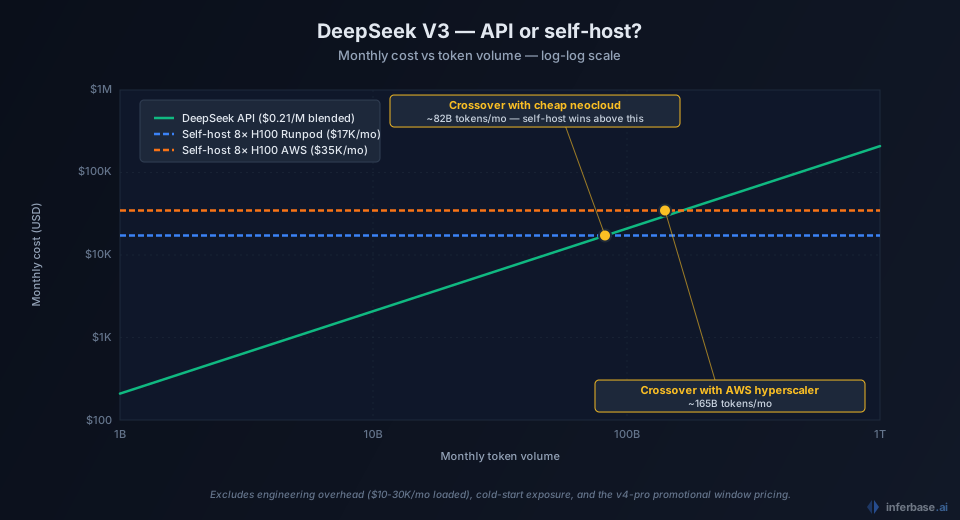
So self-hosting V3 on the cheapest neocloud comes out 3-25× more expensive per token than the v4-flash API at typical traffic levels. Even after the v4-pro promo expires, the API beats self-hosting on the cheapest hardware tier. Self-hosting only catches up with the API economically when:
- Steady-state output volume exceeds ~50B tokens per month per cluster. Below that, the GPU sits idle for portions of the day and the per-token cost balloons.
- Latency requirements need a kept-warm deployment. API providers add 100-300ms over a hot self-host.
- Compliance / data residency rules out the DeepSeek-hosted API entirely.
- You're running a fine-tuned variant that the public API doesn't serve.
If none of those apply, paying DeepSeek $0.21-0.65 per million tokens is strictly cheaper than self-hosting $3-7 per million on equivalent hardware. The gap widens further when you include engineering overhead. Keeping an 8-GPU vLLM cluster healthy, monitored, and scaled runs roughly $10-30K per month of loaded engineering cost on a small team.
Where the math flips
Three workload patterns where self-hosting V3 makes economic sense:
High-volume code generation pipelines. A continuous batch-inference workload pushing 100B+ tokens through V3 per month (typical of large-scale code refactoring, automated PR generation, or codebase-wide analysis) moves the per-token cost on a self-hosted cluster below the DeepSeek API. The example: a 200-engineer org running V3 as the primary code agent at 4-5 prompts per developer per minute averages 80-120B tokens/month, which puts self-hosting roughly at parity with the API.
Regulated workloads. Healthcare, defense, financial services contexts where the cost of API egress is reputational rather than just dollar, and the calculus changes entirely. Self-hosting becomes a compliance prerequisite, not a cost optimization.
Fine-tuned variants. The DeepSeek API doesn't serve customer fine-tunes (yet). If your evaluation shows that a fine-tuned V3 outperforms the base model by 5-10 points on your domain benchmarks, the only path to production is self-hosting the tuned weights.
For everyone else: ship on the DeepSeek API, monitor your spend, and revisit self-hosting if your monthly bill crosses ~$15K and your traffic profile is steady enough to justify a kept-warm cluster.
What this looks like in the calculator
Open the GPU Capacity Planner with the DeepSeek V3 preset selected and the heavy workload preset chosen. Because V3 uses Multi-head Latent Attention, the planner sizes its KV cache from the compressed latent rather than per-head, so the recommended configuration lands on either 8× H100 SXM at FP8 or 5× H200 SXM at FP8. The reasoning panel explains why specific GPUs were ranked lower (memory headroom, latency target). The planner reports the hardware, VRAM, throughput, and latency; pair it with the hourly rates below to get the monthly TCO.
Compare that against the API path by running the same prompt-output mix through the pricing audit's framework: for most realistic traffic profiles, the API number is significantly smaller. That's the data-driven version of the recommendation above.
For deeper reading on the underlying calculations, see the methodology post. For the broader inference-cost picture, the hidden costs of LLM APIs covers the four factors that determine actual production spend across both lanes.
One assumption running through the crossover math deserves to be named: it treats the two lanes as exclusive, with all traffic on one side of the line. Production rarely ends up there. The teams for whom the math flips usually flip it for part of their traffic (the sustained batch pipeline, the fine-tuned variant) while the rest stays on an API, which is the same open-versus-proprietary tradeoff resolving differently per workload rather than once per company. Operating that mixed portfolio is a model routing problem: a routing layer keeps the self-hosted cluster and the API lanes behind one endpoint and assigns each request to whichever side of the crossover it actually belongs on.