A common conversation when teams start sizing self-hosted LLM deployments: someone runs the model spec through Hugging Face's Model Memory Calculator, gets a number, provisions accordingly, and discovers two weeks later that production load OOMs the cluster. The calculator is a useful tool: fast, free, and honest math for the assumptions it bakes in. But the assumptions are 2023-vintage, and inference serving has moved fast enough since then that the public calculators systematically miss in the same three places.
This post is about those three places: paged attention, FP8 KV precision, and Mixture-of-Experts memory math. Each one independently changes VRAM requirements by 15-50%, and the combination on a model like Llama 4 Scout can throw a calculator's estimate off by a factor of 6 in either direction. The goal here isn't to dunk on HF's calculator (it's a perfectly reasonable tool for the model class it was built for); it's to make the gap visible so teams sizing 2026-vintage deployments know what to verify by hand.
What public calculators get right
Before getting into where the math goes wrong, it's worth saying what public calculators do well. The base-case formula for transformer inference VRAM is largely correct across them:
Total VRAM ≈ model_weights + KV_cache + activations + runtime_overhead
For a dense FP16 model with standard attention and no MoE:
model_weights = num_params × bytes_per_param(gets this right)KV_cache = 2 × num_layers × num_heads × head_dim × bytes × context × batch(gets this almost right; the bug is using num_heads instead of num_kv_heads on GQA models)activations ≈ 3-5% of weights(close enough for inference)runtime_overhead ≈ 1-2 GB(close enough)
For a Llama 2 7B FP16 deployment with standard attention, no GQA, no quantization, no MoE (the kind of deployment people were sizing in 2023), public calculators are within 5-10% of actual VRAM. The problems start when any modern serving optimization enters the picture.
Gap 1: Paged attention isn't modeled
Standard KV cache pre-allocates the full max-context window per slot in the batch. If you set max_seq_len=32768 and batch_size=16, you reserve 32768 × bytes_per_token × 16 of KV memory regardless of how long the actual requests are. A workload where most responses are 200-500 tokens leaves enormous chunks of that pre-allocation unused, but the memory is still committed and unavailable for new batched requests.
Paged attention (introduced in vLLM, now standard in TGI, TensorRT-LLM, SGLang) breaks the per-slot allocation into 16-token blocks that are allocated on demand. Memory commitment tracks actual usage rather than max possible usage. The aggregate KV memory savings depend on response-length variance:
| Workload pattern | KV savings vs standard |
|---|---|
| Uniform long responses (32K every time) | ~3% |
| Chat workload (mixed 100-2000 tokens) | 12-18% |
| Tool-use agent (mixed 50-5000 tokens) | 15-22% |
| Code generation (mixed 200-8000 tokens) | 10-15% |
Public calculators model the standard pre-allocation case, which is the worst case. For any workload running on vLLM 0.4+ (released 2024), the predicted KV is 10-22% high. Production deployments that size for the calculator's prediction end up over-provisioning hardware by roughly that margin. Cost penalty isn't catastrophic, but on a $15K/month cluster that's $1,500-3,300 of monthly waste.
The Inferbase GPU Capacity Planner lets you select the KV cache strategy explicitly (standard, paged_attention, prefix_caching) and applies the relevant memory efficiency multiplier. Run any production model side-by-side with both settings to see the difference.
Gap 2: FP8 KV cache precision is invisible
Hopper-class GPUs (H100, H200) and Blackwell (B100, B200) natively support FP8 arithmetic. The often-overlooked use of this is the KV cache: storing K and V tensors in FP8 instead of FP16 halves the per-token KV memory with negligible quality loss. vLLM 0.5+, TensorRT-LLM 0.11+, and SGLang 0.3+ all support kv_cache_dtype="fp8" as a serving flag.
For Llama 3.3 70B at 8K context with batch=16:
- FP16 KV: 2 × 80 × 8 × 128 × 2 bytes × 8192 × 16 / 1024^3 = 40 GB
- FP8 KV: 2 × 80 × 8 × 128 × 1 byte × 8192 × 16 / 1024^3 = 20 GB
That 20 GB delta on a single H100 is the difference between "fits with comfortable headroom" and "OOMs at peak load." Public calculators don't expose KV precision as a separate parameter from model weight precision, so they implicitly assume KV stays at FP16 even when the model weights are FP8. That's not how production serving works in 2026; most teams running FP8 weights also enable FP8 KV.
Inferbase's calculator separates the two: quantization controls weight precision, kv_cache_precision controls KV. You can model the cross-product of every combination. A common production config (FP8 weights + FP8 KV) is roughly 50% smaller VRAM than what a public calculator would predict for the same model.
Gap 3: MoE memory math is structurally wrong
This is the largest gap. Mixture-of-Experts models have two parameter counts:
- Total parameters: all expert weights that must be VRAM-resident
- Active parameters per token: only the experts the router selects for a given token
For Llama 4 Scout: 109B total, 17B active. For Mixtral 8×22B: 141B total, 39B active. For DeepSeek V3: 671B total, 37B active.
Memory consumption tracks total params (all experts must be in VRAM in case the router picks them next). Throughput, prefill speed, and per-token latency all track active params (only those weights are read per decode step).
Public calculators ask for a single "parameter count" field and apply it uniformly. The user has to choose which number to enter, and either choice produces a wrong answer:
- Enter total (e.g., 109B for Scout): the calculator over-estimates compute requirements by 6×, projecting absurdly low throughput. Per-token cost looks unattractive, leading teams to dismiss self-hosting MoE.
- Enter active (e.g., 17B for Scout): the calculator under-estimates VRAM by 6×, projecting that Scout fits on a single H100 80GB. The deployment fails to load.
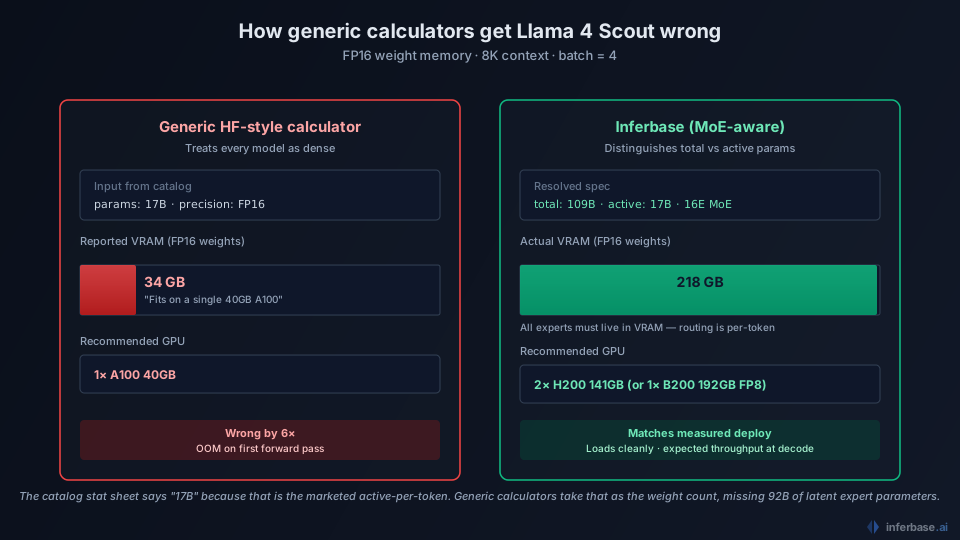
There's no "right" single number to enter. The calculator's data model doesn't admit the distinction MoE makes.
Inferbase's calculator has explicit total + active fields, with one-click presets for the major MoE families (Llama 4 Scout/Maverick, Mixtral 8×22B/8×7B, DeepSeek V3). Memory math uses the total figure, compute math uses the active figure. We covered the full implications in the Llama 4 Scout sizing post and DeepSeek V3 cost analysis. The short version is that this distinction is the single most important sizing decision for any 2026 deployment of an MoE model.
A worked example showing all three gaps stacking
Llama 4 Scout, 8K context, batch=16, vLLM 0.6 with FP8 weights and FP8 KV:
| Calculator approach | Predicted VRAM | Recommendation | Reality |
|---|---|---|---|
| HF Calculator with 17B active entered, FP16 weights | ~35 GB | Single H100 80GB | OOMs at load (actual = 110 GB) |
| HF Calculator with 109B total entered, FP16 weights | ~220 GB | 4× H100 80GB | Correct GPU count, wrong precision (could fit on 2× at FP8) |
| Public calculator without paged attention or FP8 KV awareness | ~140 GB at FP8 | 2× H100 80GB | Tight; KV pressure causes OOM under load |
| Inferbase with MoE preset, FP8 weights, FP8 KV, paged attention | ~98 GB at FP8 | 2× H100 80GB or 1× H200 | Matches measured vLLM deployment within ~10% |
The compounding errors stack: ignoring paged attention overstates KV by ~15%, ignoring FP8 KV overstates KV by another 100%, ignoring MoE structure causes a 6× error in either direction depending on which input number the user picks. Together these can produce sizing recommendations that are wrong by an order of magnitude.
What to verify by hand
If you're not using a calculator that handles all three of these (or if you're sanity-checking any calculator's output), the verification steps:
- Confirm
num_kv_headsis in the formula, notnum_heads. For modern GQA models, kv_heads is typically 8 regardless of attention heads. If the calculator is using 32 or 64 heads for KV, divide its KV estimate by 4 or 8. - Apply paged attention discount if you're serving on vLLM/TGI/TensorRT-LLM/SGLang: multiply the calculator's KV estimate by ~0.85 for typical workloads.
- Apply FP8 KV discount if running FP8 KV cache on Hopper/Blackwell: multiply the KV estimate by 0.5.
- For MoE: split the calculator's prediction into memory (use total params) and compute (use active params); the calculator's single-number output for either dimension will be off by the total/active ratio.
Or, alternately, use the Inferbase calculator which models all of these by default. The methodology post walks through the full formulas.
What public calculators are still useful for
Despite the gaps, public calculators remain a reasonable starting point for:
- Quick estimates of dense pre-2024 models (Llama 2, Mistral 7B, Falcon) where the assumptions match production
- Order-of-magnitude sanity checks before committing to detailed sizing
- Education about transformer memory structure for engineers new to the space
The Hugging Face calculator in particular has been a valuable on-ramp for the open-source community. The argument here isn't that it's a bad tool. It's that the tool was built for a 2023-2024 inference world that has materially changed. Public calculators will catch up; the open-source ecosystem moves fast. In the meantime, sizing 2026-vintage deployments needs more care than running a 7B model card through a generic estimator.
For a deeper look at how the corrected math compares against actual hardware measurements, see our companion post on roofline estimates vs vLLM benchmarks. For the broader inference cost picture these sizing decisions sit inside, the pricing audit covers the May 2026 landscape.