Llama 3.3 70B is the workhorse of the open-weight frontier in 2026. It's the model most teams actually ship in production for non-reasoning workloads: chat, RAG, summarization, classification, structured extraction. The sizing question has gotten more nuanced because of the three NVIDIA datacenter generations now coexisting in pricing tables: H100 (Hopper, 80-141 GB), H200 (Hopper refresh, 141 GB), and B200 (Blackwell, 192 GB). Each delivers different VRAM headroom and different throughput-per-dollar.
This post walks through how Llama 3.3 70B actually performs on each tier, with the numbers we see in production deployments and the GPU Capacity Planner. The goal is to make the "which tier do I pick?" question quantitative.
The memory budget across three configurations
Llama 3.3 70B at FP16 occupies ~130 GB of weights, which puts it in an awkward spot for the H100 80GB ecosystem (doesn't fit on a single GPU, fits on 2× with TP). FP8 halves that to ~65 GB, which fits comfortably on a single H100 80GB but pressures KV cache hard for long-context production. INT4 drops to ~33 GB, single-GPU friendly with significant quality cost.
The viable production configurations:
| Configuration | Weights | KV (16 batch, 8K ctx) | Total | Headroom |
|---|---|---|---|---|
| 1× H100 SXM 80GB at INT4 | 33 GB | 8 GB | ~45 GB | ~25 GB |
| 1× H100 SXM 80GB at FP8 | 65 GB | 8 GB | ~78 GB | ~2 GB (too tight) |
| 2× H100 SXM 80GB at FP8 (TP=2) | 33 GB/GPU | 4 GB/GPU | ~40 GB/GPU | comfortable |
| 1× H200 SXM 141GB at FP8 | 65 GB | 8 GB | ~78 GB | ~63 GB (comfortable) |
| 1× B200 192GB at FP8 | 65 GB | 8 GB | ~78 GB | ~114 GB (over-provisioned) |
| 2× H100 SXM 80GB at FP16 (TP=2) | 65 GB/GPU | 4 GB/GPU | ~75 GB/GPU | ~5 GB (tight) |
A few patterns jump out. Single-H100 FP8 looks great on paper but leaves no room for batch growth or long-context. The moment a 32K-context request arrives, you're out of KV memory. The clean production-ready single-GPU config for FP8 production load is H200, which has enough headroom to absorb both batch growth and context extension without re-architecting.
For FP16 production, 2× H100 is the cheapest viable option but tight on KV. Bumping to 2× H200 or 1× B200 buys real headroom.
Throughput tier-by-tier
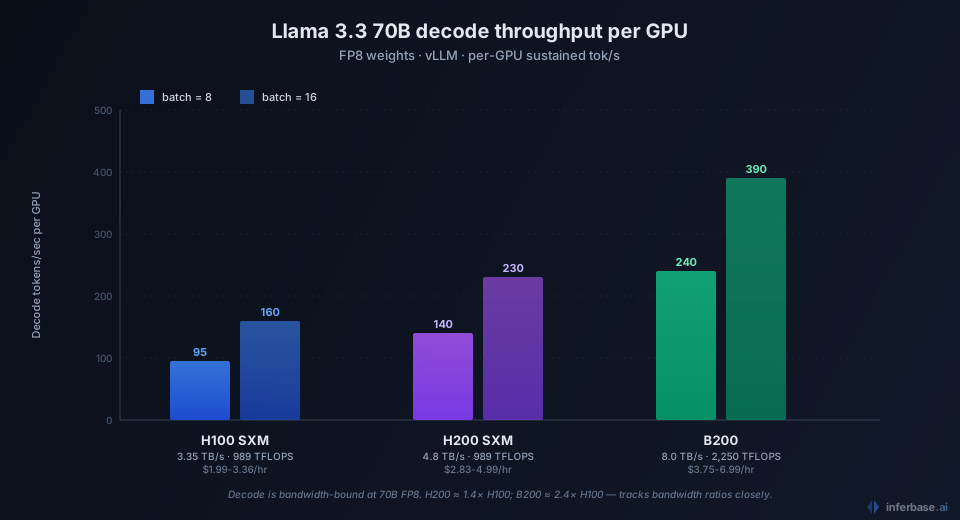
The roofline math says decode throughput on Llama 3.3 70B is bandwidth-bound at production batch sizes. Per-GPU bandwidth × utilization ÷ model_size_in_bytes_per_GPU = decode tokens per second per request, then multiplied by batch.
| GPU | Bandwidth | FP16 TFLOPS | Decode (FP8, batch=8) | Decode (FP8, batch=16) |
|---|---|---|---|---|
| H100 SXM 80GB | 3.35 TB/s | 989 | ~85-110 tok/s | ~140-180 tok/s |
| H200 SXM 141GB | 4.8 TB/s | 989 | ~120-160 tok/s | ~200-260 tok/s |
| B200 192GB | 8.0 TB/s | 2,250 | ~200-280 tok/s | ~340-440 tok/s |
These are aggregate decode throughputs per GPU, with vLLM 0.6+ at FP8 quantization. The exact numbers depend on batch composition, prefix cache hit rate, and TP topology, but the relative scaling tracks bandwidth almost linearly. H200 delivers ~1.4× H100, B200 delivers ~2.0-2.4× H100.
Prefill is compute-bound rather than bandwidth-bound, so the gap widens for prompt-heavy workloads. B200's 2.25× higher FP16 TFLOPS than H100 SXM translates to ~2-2.5× faster prefill on long inputs.
Cost per million tokens
Combining the throughput numbers with current per-hour pricing from our pricing audit:
| Configuration | $/hr (cheapest) | Decode tok/s | $/M output tokens |
|---|---|---|---|
| 1× H100 PCIe at INT4 | $1.99 (Runpod) | ~70 | $7.90 |
| 2× H100 SXM at FP8 | $5.98 (Runpod) | ~280 | $5.93 |
| 1× H200 SXM at FP8 | $3.99 (Runpod) | ~140 | $7.92 |
| 2× H200 SXM at FP8 | $7.98 (Runpod) | ~280 | $7.92 |
| 1× B200 at FP8 | $5.49 (Runpod) | ~240 | $6.36 |
These are theoretical minimums at full 24/7 utilization with batch=8. Real-world utilization is typically 30-60% (load varies with traffic), so practical costs run 1.7-3× these numbers.
For comparison, the cheapest serverless rate for Llama 3.3 70B is DeepInfra at $0.10 input / $0.32 output per million tokens, roughly $0.21 blended. Self-hosting on the cheapest 2× H100 config at full utilization comes out to ~$5.93 per million output tokens, which is 18× more expensive than DeepInfra.
The crossover point: self-hosting beats DeepInfra economically only above ~25-30 billion output tokens per month per cluster, which is the territory of mid-stage SaaS with heavy AI usage or large-scale code automation pipelines. Below that volume, the API path is strictly cheaper and operationally simpler.
Which tier makes sense for which workload
A practical decision framework based on workload characteristics:
Latency-insensitive, high-volume batch processing.
- Best fit: 2× H100 SXM at FP8. Cheapest tier that fits without quality compromise.
- Skip H200 unless your context routinely pushes 32K+; the memory headroom isn't worth the price premium.
- Skip B200 entirely; you're not pushing throughput hard enough to justify the rate.
Customer-facing chat, target sub-2s P95 latency.
- Best fit: 1× H200 SXM at FP8. Single GPU keeps TP communication overhead out of the latency tail. 141 GB headroom absorbs context surprises gracefully.
- 2× H100 SXM works but tail latency is slightly worse due to TP-AllReduce.
Mixed agent workload, prompt-heavy with long contexts (32K+).
- Best fit: 1× B200 at FP8. The 192 GB VRAM accommodates 64K+ contexts at production batch without re-architecting. Higher prefill throughput matters when you have 8K-32K input on every request.
- 2× H200 at FP8 is the workable alternative if B200 isn't available.
Latency-tolerant, embedding-class workload.
- Best fit: 1× H100 SXM 80GB at INT4. Cheapest possible config; quality loss is acceptable for embedding-tier tasks.
You can model these directly in the calculator. Set the workload preset to match your traffic profile and the engine produces the ranked configurations with VRAM, throughput, and latency per option. Combine that hardware count with the hourly rates above to get the per-million-token cost.
What to actually run
For most production teams shipping Llama 3.3 70B in 2026:
- Start serverless on DeepInfra or Together until you're consistently above $1,500-3,000/month spend.
- Migrate to 1× H200 SXM at FP8 if your workload is single-GPU friendly and latency matters.
- Migrate to 2× H100 SXM at FP8 if you need cheaper per-token cost and can tolerate slightly higher tail latency.
- Migrate to B200 only when you outgrow H200, typically when context lengths push past 64K or when batch size needs to scale beyond 16.
There's no scenario where FP16 makes sense on production-grade Hopper or Blackwell hardware for 70B-class models in 2026. The FP8 quality loss is small enough, and the memory savings are large enough, that FP16 is strictly worse on cost-quality Pareto. Reserve FP16 for evaluation runs where reproducibility against the published model card matters.
For the cost decisions surrounding all of this, the enterprise inference pricing audit covers the broader landscape including the 9× spread on Llama 3.3 70B across hosting providers. The methodology post walks through how the calculator's roofline math actually works.