The number of available AI models has grown from a handful to several hundred in the span of two years. OpenAI, Anthropic, Google, Meta, Mistral, DeepSeek, and dozens of smaller labs each maintain multiple model families with overlapping capabilities, different pricing structures, and varying benchmark profiles. For engineering teams evaluating which model to build on, or which combination of models to use across different parts of a system, the AI model comparison problem has become a multi-dimensional optimization exercise rather than a simple ranking question.
The difficulty is not a shortage of information. Provider documentation, leaderboard rankings, and community benchmarks all offer data points. The difficulty is that most of this information is fragmented across sources, measured under inconsistent conditions, and presented without the context needed to make it actionable. A model that leads one benchmark may trail on another. The cheapest option per token may be the most expensive per successful completion. The largest context window may not actually retrieve information reliably at the distances it advertises.
What follows is a structured framework for comparing AI models systematically across five dimensions: benchmarks, pricing, capabilities, context windows, and latency. Each section explains what the dimension actually measures, where it misleads, and how to weight it relative to the others.
The five dimensions of AI model comparison
Every model comparison reduces to five dimensions. The weight you assign to each depends on your use case, but ignoring any of them tends to produce decisions that look good on paper and fail in production.
1. Benchmark performance
Benchmarks are the most visible and most misunderstood dimension of model comparison. They provide standardized measurements of specific capabilities (reasoning, coding, mathematics, general knowledge) under controlled conditions. The major benchmarks worth tracking fall into three categories.
Reasoning and knowledge
- MMLU / MMLU Pro: Multiple-choice questions across 57 academic subjects. Widely reported but increasingly saturated, with most frontier models scoring above 85%, making differentiation difficult at the top.
- GPQA: Graduate-level science questions designed to be difficult even for domain experts. More discriminating than MMLU for frontier models.
- ARC-Challenge: Grade-school science questions requiring multi-step reasoning. Useful for evaluating smaller models where MMLU scores still vary meaningfully.
Coding
- HumanEval / HumanEval+: Function-level code generation from docstrings. The most commonly cited coding benchmark, though it tests a narrow slice of real programming work.
- SWE-bench Verified: Resolving real GitHub issues from popular open-source repositories. More representative of actual software engineering than HumanEval, but harder to run and less frequently reported.
- LiveCodeBench: Continuously updated coding problems designed to prevent contamination. Increasingly important as training data overlap becomes a concern with static benchmarks.
Mathematics
- MATH / AIME: Competition-level mathematics testing symbolic reasoning and multi-step problem solving. Strong correlation with general reasoning ability.
- GSM8K: Grade-school math word problems. Mostly saturated for frontier models but still useful for evaluating smaller or quantized models where performance gaps persist.
The benchmark trap. Benchmarks measure performance under specific prompting conditions, with specific evaluation criteria, on specific distributions of problems. A model scoring 92% on MMLU and 85% on HumanEval will not necessarily outperform a model scoring 88% and 90% respectively. The right choice depends entirely on whether your workload looks more like academic question-answering or code generation. Treat benchmarks as a filtering mechanism to narrow the candidate set, not as a ranking mechanism to make the final decision.
You can compare models across benchmark categories side by side, which makes it easier to focus on the specific benchmarks that matter for your workload rather than aggregate scores that flatten important distinctions.
2. Pricing
AI model pricing follows a simple structure on the surface (cost per million input tokens and cost per million output tokens) that obscures significant complexity in practice.
The input/output ratio matters. Models are priced asymmetrically: output tokens typically cost 3-5x more than input tokens. The effective cost of a model therefore depends heavily on your workload shape. Summarization tasks (long input, short output) favor models with cheap input pricing. Code generation tasks (short prompt, long output) are more sensitive to output pricing. A model that appears 30% cheaper on input pricing may actually cost more if your workload is output-heavy.
Cost per token versus cost per completion. The most common pricing mistake is comparing per-token rates without accounting for completion quality. If a cheaper model requires longer prompts to achieve the same output quality, or produces outputs that fail validation and need to be regenerated, the effective cost per successful completion may exceed that of a more expensive model that gets it right on the first attempt. We covered this dynamic in detail in our LLM cost optimization guide, including techniques like model routing and prompt caching that reduce effective costs without switching models.
Pricing tiers. The market has settled into rough tiers:
| Tier | Input (per 1M tokens) | Output (per 1M tokens) | Examples |
|---|---|---|---|
| Budget | $0.10 - $0.30 | $0.25 - $1.00 | GPT-4.1 Nano, Gemini Flash Lite, Mistral Small |
| Mid-range | $0.50 - $3.00 | $2.00 - $15.00 | Claude Sonnet, GPT-4.1, Gemini Pro |
| Frontier | $5.00 - $15.00 | $15.00 - $60.00 | Claude Opus, GPT-5, Gemini Ultra |
| Reasoning | $10.00 - $20.00 | $30.00 - $80.00 | o3, Claude with extended thinking |
3. Context window
Context window (the maximum number of tokens a model can process in a single request) has expanded dramatically, from 4K tokens in early GPT-3.5 to 1-2 million tokens in current Gemini models. But the headline number is often misleading.
Effective context versus advertised context. Most models experience degradation in retrieval accuracy as the input length approaches the advertised limit. A model with a 200K context window may retrieve information reliably at 100K tokens but miss or hallucinate details at 180K. The "lost in the middle" phenomenon, where models attend more strongly to information at the beginning and end of the context while neglecting the middle, remains a factor even in current-generation models.
When context window matters. Context window is a binding constraint for specific workloads: long-document analysis, multi-file code review, extended conversation histories, and large-context RAG. For most other tasks (classification, short-form generation, structured extraction) any model with a 32K+ context window is sufficient. Comparing models on context window only matters when your workload regularly exercises it.
4. Capabilities
Beyond raw performance, models differ in the specific features they support. These capability differences are often more consequential than benchmark deltas for production systems.
Function calling and tool use. The ability to generate structured function calls that integrate with external APIs. Essential for agentic workflows, but implementation quality varies. Some models hallucinate function names or produce malformed arguments more frequently than others.
Vision and multimodal input. Processing images, documents, or other non-text inputs alongside text. Important for document understanding, UI analysis, and visual reasoning tasks. Not all "multimodal" models handle all modalities equally well.
Structured output (JSON mode). Guaranteed valid JSON output, which is critical for any pipeline where model output feeds into downstream processing. Models without reliable JSON mode require additional parsing and validation logic that adds complexity and failure points.
Streaming. Incremental output delivery, necessary for interactive applications where perceived latency matters. Virtually all major models now support streaming, but token-level streaming behavior (consistency, chunking) varies across providers.
System prompts. Dedicated system message support for persistent instructions. Affects instruction-following reliability and is particularly important for applications with complex behavioral requirements.
The Inferbase model catalog lets you filter by these capabilities directly, so you can eliminate models that lack required features before spending time on benchmark comparisons.
5. Latency
Latency in AI model inference has two distinct components that affect different use cases differently.
Time-to-first-token (TTFT). The delay between sending a request and receiving the first token of the response. Critical for interactive applications (chat interfaces, real-time assistants) where perceived responsiveness drives user experience. TTFT varies significantly across providers and is influenced by current load, geographic routing, and model size.
Throughput (tokens per second). The rate of token generation after the first token. Determines how quickly a complete response is delivered. More important for batch processing, long-form generation, and code completion where the total generation time matters more than the initial response time.
Latency versus cost trade-off. Faster inference generally costs more. Providers like Groq and Cerebras offer dramatically lower latency through specialized hardware, but often at a premium or with model selection constraints. For latency-sensitive applications, the comparison is not just "which model is fastest" but "which model meets my latency requirements at the lowest cost."
Practical comparison workflows
With the framework established, the question becomes how to structure an actual model comparison for common scenarios. The approach differs depending on whether you are selecting models for a new project, optimizing costs on an existing one, or evaluating a migration.
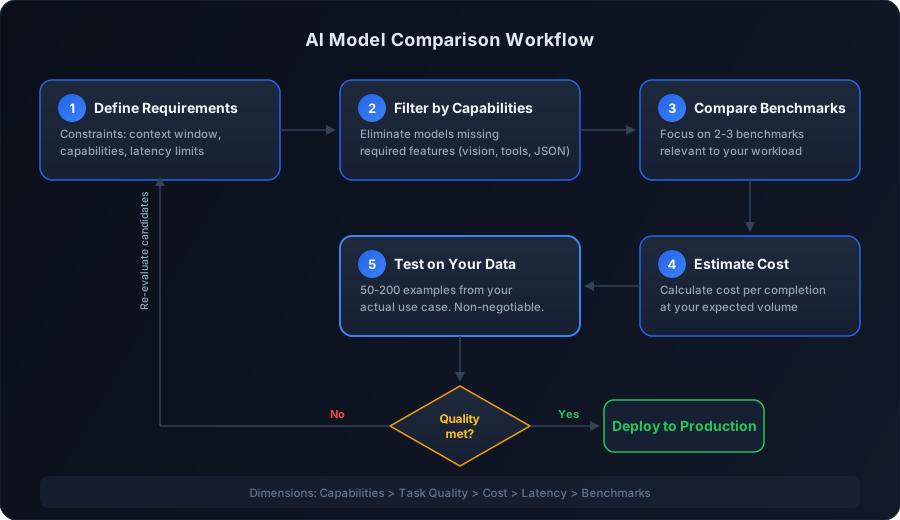
Comparing models for a new project
When evaluating models for a greenfield project, start broad and narrow systematically:
-
Define your requirements. Identify which dimensions are binding constraints (minimum context window, required capabilities like vision or function calling) versus preferences (lower cost, better benchmark scores). Constraints eliminate candidates; preferences rank them.
-
Filter by capabilities. Remove any model that lacks a required capability. There is no point in comparing benchmark scores for a model that does not support function calling if your application requires it.
-
Compare benchmarks within the relevant category. If you are building a coding assistant, weight HumanEval and SWE-bench scores heavily. If you are building a research tool, prioritize MMLU Pro and GPQA. Ignore benchmarks that do not map to your workload.
-
Estimate cost at your expected volume. Calculate monthly cost based on your projected request volume, average input length, and average output length. A model that costs 2x more per token but requires half the retries may be cheaper in practice.
-
Test on your own data. Build a test set of 50-200 representative examples from your actual use case. Run the top 2-3 candidates against this set and score outputs on task-specific criteria. This step is non-negotiable. Benchmarks predict directional trends, not absolute performance on your specific distribution.
We walk through the full selection methodology, including how to weight these factors for different use cases, in our guide to choosing the right AI model.
Comparing models for cost optimization
When you have a working system and want to reduce costs:
-
Profile your current workload. Measure actual input/output token distributions, success rates, and retry rates. Many teams discover their average request uses far fewer tokens than they assumed.
-
Identify the model tier your task actually requires. Most production workloads include a mix of simple and complex tasks routed to the same model. Classification, extraction, and simple Q&A often perform equally well on models that cost 10-20x less than frontier options.
-
Compare within the target tier. Once you have identified the appropriate tier, compare the 2-3 best options on your specific task. The differences between models within the same tier are smaller than the differences between tiers, so the cost savings from moving to the right tier typically dominate.
Comparing models for migration
When evaluating whether to switch from one model to another:
-
Establish your current baseline. Measure quality, cost, and latency on your production workload before testing alternatives. Without a clear baseline, you cannot quantify the improvement or regression from switching.
-
Run parallel evaluation. Send a sample of production traffic to both the current and candidate models, then compare outputs on your quality criteria. Shadow testing is preferable to synthetic benchmarks because it captures the full distribution of inputs your system actually handles.
-
Account for switching costs. Prompt engineering, output parsing, and edge case handling are often model-specific. A model that scores 5% higher on benchmarks may require significant prompt rework that offsets the quality gain. Factor in the engineering effort required to migrate, not just the performance delta.
Using comparison tools effectively
Manual comparison (reading documentation, cross-referencing benchmark tables, calculating pricing) becomes impractical beyond two or three models. Comparison tools address this by aggregating data into a unified interface where you can evaluate models across dimensions simultaneously.
When using any comparison tool, including Inferbase's model comparison, keep the following in mind:
Compare within the same tier. Comparing a budget model against a frontier model is rarely informative. The frontier model will win on quality and lose on cost, which you already knew. The most valuable comparisons are between models in the same price range or capability tier, where the differences are subtle and the right choice is less obvious.
Weight the relevant benchmarks. A comparison showing 15 benchmark scores can be overwhelming. Focus on the 2-3 benchmarks that most closely map to your use case. A coding assistant comparison should prioritize HumanEval and SWE-bench over MMLU. A general-purpose chatbot comparison should prioritize chat and instruction-following metrics.
Look at capabilities, not just scores. Two models with similar benchmark profiles may differ significantly in capability support. If your application requires function calling and JSON mode, a model that scores 3% lower on MMLU but supports both capabilities reliably is the better choice.
Test before committing. Comparison tools are for narrowing the candidate set, not for making the final decision. The final decision should always be based on evaluation against your own data, in your own pipeline, with your own quality criteria.
The comparison dimensions that actually matter
The temptation in model comparison is to optimize for the dimension that is easiest to measure (typically benchmark scores) while underweighting the dimensions that are harder to quantify but more consequential in practice.
For most production systems, the ranking of importance is:
- Capabilities - if a model does not support what you need, everything else is irrelevant
- Quality on your specific task - benchmark scores are directional, not definitive
- Cost at your volume - pricing matters more than pricing differences
- Latency - only binding if your use case is latency-sensitive
- Benchmarks - useful for filtering, misleading for ranking
The models that look best on leaderboards are not always the models that work best in production. The goal of comparison is not to find the "best" model in some absolute sense. It is to find the best model for what you are building, at the scale you are operating, within the constraints you are working under.
That distinction, between optimizing for leaderboard position and optimizing for production fit, is what separates model evaluations that inform real engineering decisions from those that generate impressive-looking spreadsheets nobody acts on. Start with your requirements, filter by capabilities, compare within the right tier, and validate on your own data. The model comparison tool handles the data aggregation. The judgment calls are yours.
The discipline in this guide also has a structural limit worth naming: it runs at selection time, against a snapshot. Production traffic is not one workload (easy and hard requests arrive at the same endpoint) and the catalog it was compared against keeps moving. The continuous version of the same method, filtering by capability and comparing within tier for every request rather than once per quarter, is model routing, and our best models pages keep the tier-by-tier standings current between your own evaluation passes.